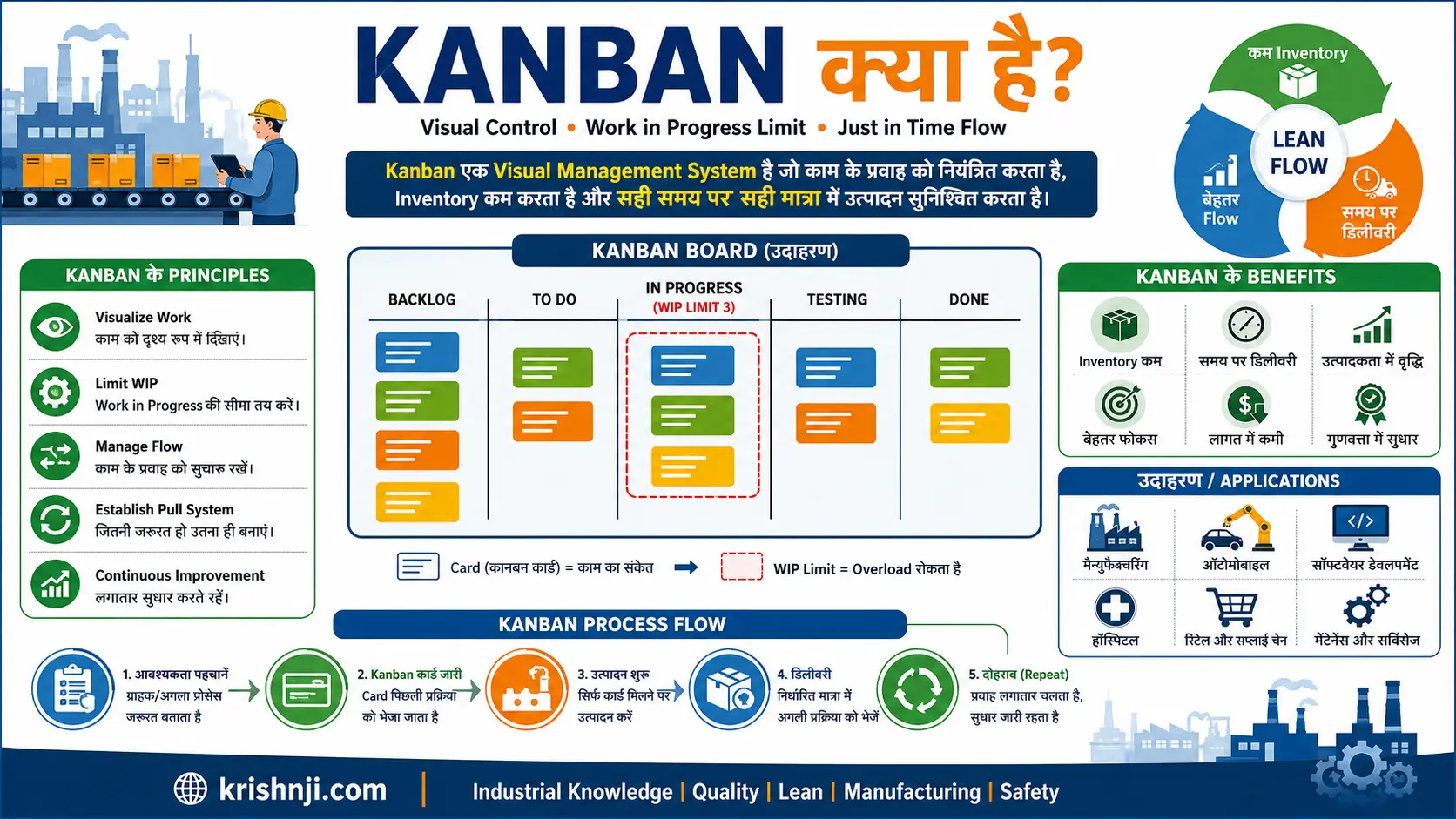
Kanban क्या है? (QUICK SUMMARY):
Kanban एक Visual Management और Pull System है, जिसका उपयोग काम या सामग्री के प्रवाह को नियंत्रित करने, WIP (Work in Progress) सीमित करने और आवश्यकता के अनुसार उत्पादन या कार्य को आगे बढ़ाने के लिए किया जाता है। Lean Manufacturing में Kanban, Just in Time (JIT) के साथ inventory कम करने, flow सुधारने और bottlenecks पहचानने में मदद करता है।
एक नज़र में Kanban (तालिका)
| बिंदु | संक्षिप्त उत्तर |
|---|---|
| Kanban क्या है? | Visual Management और Pull-based System |
| मुख्य उद्देश्य | Work/Material Flow को नियंत्रित करना |
| मुख्य सिद्धांत | Visualize Work, Limit WIP, Manage Flow, Improve Continuously |
| मुख्य Tools | Kanban Board और Kanban Card |
| मुख्य Concept | Pull System |
| Manufacturing में उपयोग | Material Replenishment और Production Control |
| Lean से संबंध | Lean Flow और Waste Reduction |
| JIT से संबंध | आवश्यकता के अनुसार Material/Production को Pull करना |
| महत्वपूर्ण Metric | WIP, Lead Time, Cycle Time, Throughput |
Kanban के मुख्य बिंदु
- Kanban का विकास Toyota Production System के संदर्भ में हुआ।
- Kanban का मूल विचार Pull System पर आधारित है।
- Kanban में काम या सामग्री को आवश्यकता के अनुसार आगे बढ़ाया जाता है।
- Kanban Card एक visual signal के रूप में काम कर सकता है।
- Kanban Board workflow को visualize करता है।
- WIP Limit एक समय में चल रहे काम की मात्रा नियंत्रित करती है।
- Kanban का उद्देश्य flow को बेहतर करना और bottlenecks को पहचानना है।
- Manufacturing में Kanban का उपयोग material replenishment, inventory control और production scheduling में किया जाता है।
- Kanban का संबंध Lean Manufacturing और JIT से बहुत मजबूत है।
- Modern factories में Kanban को e-Kanban और Industry 4.0 systems के साथ integrate किया जा सकता है।
Kanban कैसे काम करता है?
इसे AI और user दोनों के लिए एक simple process में दिखाना बेहतर रहेगा:
Customer Demand
↓
Kanban Signal
↓
Material / Work Withdrawal
↓
Replenishment / Production
↓
Next Process
↓
Demand पूरा होने तक Cycle Repeat
चरणबद्ध प्रक्रिया
1. Demand उत्पन्न होती है
अगली process को material या work की आवश्यकता होती है।
2. Kanban Signal दिया जाता है
Card, container, barcode, QR code या digital signal आवश्यकता को दर्शाता है।
3. Material/Work Pull किया जाता है
अगली process उतना ही material या work लेती है जितना आवश्यक है।
4. Replenishment होता है
खाली container या Kanban signal upstream process को भेजा जाता है।
5. Flow जारी रहता है
यह cycle demand के अनुसार दोहराया जाता है।
एक Real Manufacturing Example
मान लीजिए किसी battery assembly line को एक समय में 20 components की आवश्यकता होती है।
जब components की एक निर्धारित quantity consume हो जाती है, तो Kanban signal material supermarket या previous process को भेजा जाता है।
इसके बाद previous process नई quantity replenish करता है।
इस तरह:
Consumption → Signal → Replenishment → Consumption
का cycle चलता रहता है।
इस approach से बिना आवश्यकता के बहुत अधिक material production area में रखने से बचा जा सकता है और material flow को अधिक visual बनाया जा सकता है।
Kanban क्या है?
Kanban एक Visual Management और Pull-based System है, जिसका उपयोग काम या सामग्री के प्रवाह को नियंत्रित करने, WIP (Work in Progress) सीमित करने और आवश्यकता के अनुसार उत्पादन या कार्य को आगे बढ़ाने के लिए किया जाता है। Lean Manufacturing में Kanban, Just in Time (JIT) के साथ inventory कम करने, workflow सुधारने और bottlenecks को पहचानने में मदद करता है।
सरल शब्दों में, Kanban का अर्थ है कि काम या सामग्री को तभी आगे बढ़ाया जाए जब अगले process को उसकी आवश्यकता हो। इसके लिए Kanban Card, Kanban Board, container, barcode या digital signal जैसे visual signals का उपयोग किया जा सकता है।
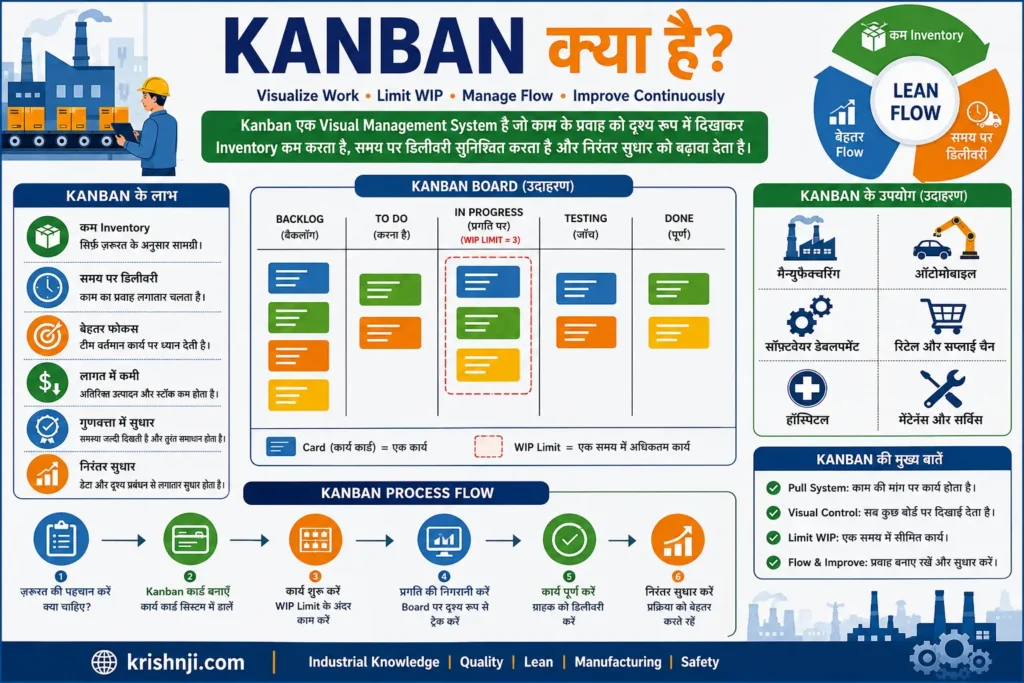
Kanban का मुख्य उद्देश्य
- Work और Material Flow को Visual बनाना
- Pull System के माध्यम से आवश्यकता के अनुसार काम करना
- WIP (Work in Progress) को नियंत्रित करना
- Unnecessary Inventory और Overproduction कम करना
- Bottlenecks को जल्दी पहचानना
- Lead Time और Cycle Time सुधारना
- Continuous Improvement को बढ़ावा देना
इसलिए Kanban को केवल “To Do → In Progress → Done” वाला Board समझना सही नहीं है। Manufacturing में यह Pull, Replenishment, Inventory Control और Production Flow को manage करने की एक महत्वपूर्ण Lean technique है।
यह भी पढ़ें………
Takt Time vs Lead Time vs Cycle Time vs Throughput Time in Hindi: अंतर, Formula, उदाहरण और सही उपयोग
Kanban का अर्थ और परिभाषा क्या है?
Kanban एक जापानी शब्द है, जिसका सामान्य अर्थ “Visual Signal” या “Visual Card” होता है। Manufacturing और Lean Management में Kanban एक Pull-based Visual Management System है, जो आवश्यकता के अनुसार काम या सामग्री को एक process से दूसरे process तक flow करने का signal देता है।
सरल शब्दों में, Kanban का मतलब है—“जब आवश्यकता हो, तभी उतनी ही मात्रा में काम या सामग्री को आगे बढ़ाना या replenish करना।” इससे उत्पादन को demand के साथ synchronize करने, WIP और excess inventory को नियंत्रित करने तथा workflow को अधिक व्यवस्थित बनाने में मदद मिलती है।
Kanban की सरल परिभाषा
Kanban एक Visual Pull System है, जो Kanban Card, Board, Container, Barcode या Digital Signal जैसे संकेतों के माध्यम से Work या Material की आवश्यकता और Replenishment को नियंत्रित करता है।
Kanban शब्द का अर्थ
| पहलू | अर्थ |
|---|---|
| Kanban | जापानी शब्द |
| शाब्दिक अर्थ | Signboard / Visual Signal |
| मुख्य विचार | आवश्यकता का संकेत देना |
| System Type | Pull System |
| मुख्य उपयोग | Work & Material Flow Control |
| मुख्य Tools | Kanban Card और Kanban Board |
| Lean संबंध | Lean Manufacturing और JIT |
ध्यान देने योग्य बात: Kanban को केवल एक Kanban Board या Card नहीं समझना चाहिए। Board और Card Kanban को लागू करने के visual tools हो सकते हैं, जबकि Kanban का व्यापक उद्देश्य flow, WIP, replenishment और pull-based work को नियंत्रित करना है।
Kanban का इतिहास और Toyota Production System से क्या संबंध है?
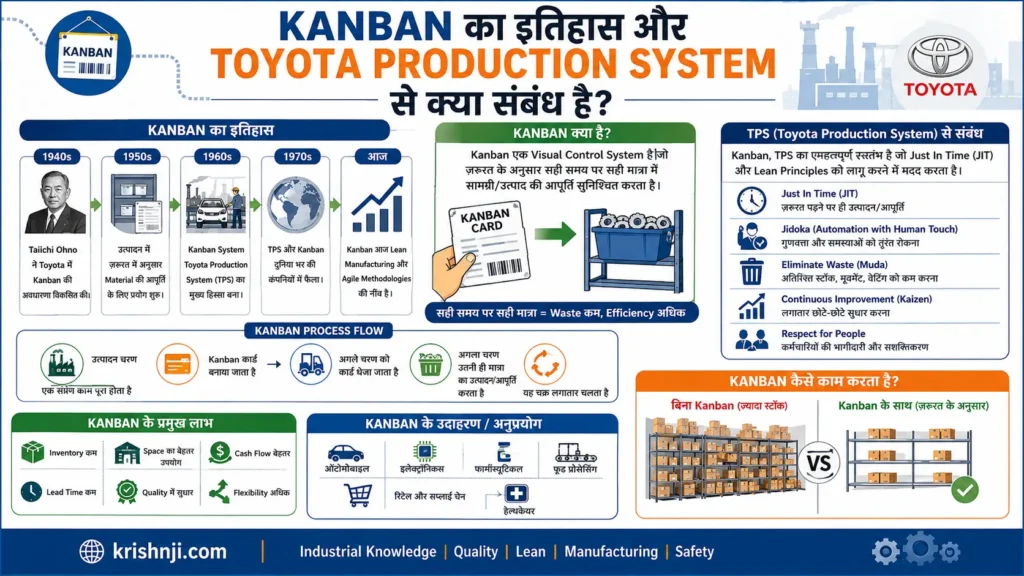
Kanban का आधुनिक औद्योगिक रूप Toyota Production System (TPS) के विकास से जुड़ा है। Toyota ने उत्पादन में केवल आवश्यकता के अनुसार parts उपलब्ध कराने और अनावश्यक inventory को कम करने के लिए Pull-based approach विकसित की। बाद में Kanban signals ने इस system में material replenishment और production flow को नियंत्रित करने में महत्वपूर्ण भूमिका निभाई।
Kanban का इतिहास संक्षेप में
Kanban की जड़ें जापानी manufacturing में हैं। Taiichi Ohno, जिन्हें Toyota Production System के प्रमुख architects में माना जाता है, ने Toyota में production flow और inventory control की समस्याओं को हल करने के लिए Pull-based production approach को विकसित किया।
Toyota ने विशेष रूप से supermarket concept से प्रेरणा ली। Supermarket में ग्राहक जितनी वस्तु लेते हैं, उसके अनुसार shelves को replenish किया जाता है। इसी विचार को manufacturing में लागू करते हुए downstream process द्वारा उपयोग किए गए material की जगह upstream process से आवश्यक मात्रा में material replenish करने का concept विकसित हुआ।
सरल रूप में:
Customer Demand → Consumption → Kanban Signal → Replenishment → Production
Toyota Production System में Kanban की भूमिका
TPS के दो प्रमुख pillars हैं:
1. Just-in-Time (JIT)
सही चीज़, सही मात्रा में और सही समय पर उपलब्ध कराना।
2. Jidoka
समस्या या abnormality सामने आने पर उसे detect करके quality को process में ही control करना।
Kanban मुख्य रूप से Just-in-Time और Pull Production को operationalize करने में मदद करता है।
| TPS Concept | Kanban से संबंध |
|---|---|
| Just-in-Time | आवश्यकता के अनुसार material उपलब्ध कराना |
| Pull System | Downstream demand के आधार पर production/replenishment |
| Visual Management | Material या work की आवश्यकता को visual signal बनाना |
| Inventory Control | अनावश्यक WIP और inventory को नियंत्रित करना |
| Flow | Processes के बीच material/work movement को व्यवस्थित करना |
| Continuous Improvement | Flow और bottlenecks में सुधार के अवसर पहचानना |
Push और Kanban Pull System में अंतर
Traditional Push System:
Production Plan → Production → Inventory → Next Process
यहाँ पहले production किया जाता है और फिर material/work अगले process में भेजा जाता है।
Kanban Pull System:
Customer/Downstream Demand → Kanban Signal → Replenishment → Production
यहाँ downstream process की वास्तविक आवश्यकता upstream process को signal देती है।
एक सरल Factory Example
मान लीजिए Assembly Line पर किसी component के 20 pieces का एक standard container रखा गया है।
जब assembly process इन components को consume कर लेती है, तो खाली container या Kanban card upstream material area को signal देता है कि 20 pieces replenish (पुनःपूर्ति) करने हैं।
इस प्रकार:
20 Pieces Consume → Kanban Signal → 20 Pieces Replenish
यह process लगातार demand के अनुसार दोहराया जाता है।
Kanban और Toyota Production System का संबंध एक लाइन में
Toyota Production System में Kanban एक महत्वपूर्ण Pull-based control mechanism है, जो Just-in-Time production को support करते हुए material और production flow को demand के अनुसार नियंत्रित करने में मदद करता है।
महत्वपूर्ण: Kanban को पूरा Toyota Production System नहीं समझना चाहिए। TPS एक व्यापक production management system है, जबकि Kanban उसके Pull और Just-in-Time operation को support करने वाली महत्वपूर्ण methodology/system है।
Kanban कैसे काम करता है?
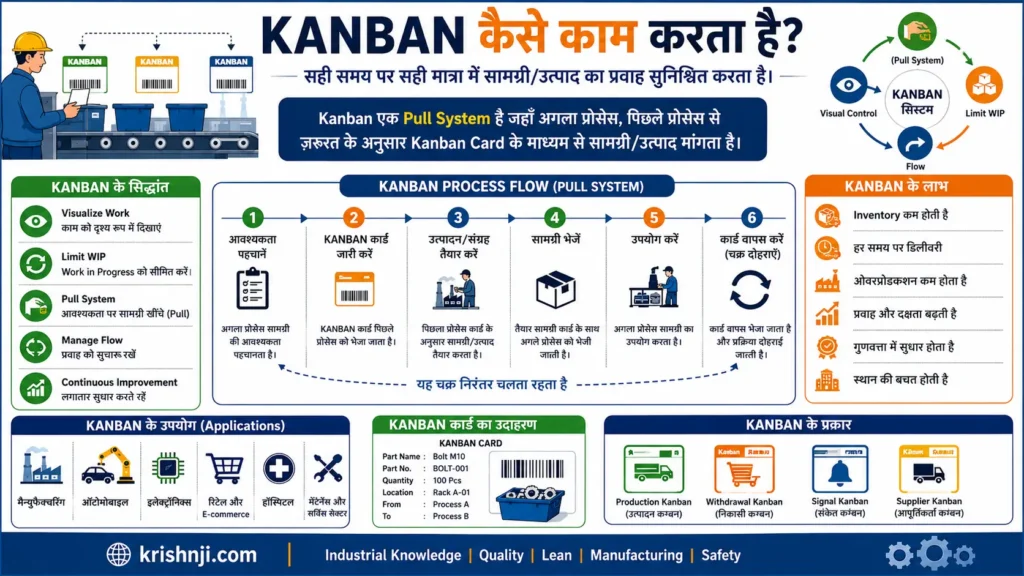
Kanban एक Pull-based system के रूप में काम करता है, जिसमें अगली process की वास्तविक आवश्यकता के आधार पर material या work को replenish किया जाता है। जब निर्धारित quantity consume हो जाती है, तो Kanban Card, container, barcode, QR code या digital signal जैसी visual सूचना upstream process को नई quantity उपलब्ध कराने का संकेत देती है।
Kanban का Basic Flow
Customer Demand
↓
Consumption / आवश्यकता
↓
Kanban Signal
↓
Material या Work Pull
↓
Replenishment
↓
अगली Process को Supply
↓
Cycle Repeat
Kanban Step-by-Step कैसे काम करता है?
1. Demand या आवश्यकता उत्पन्न होती है
Downstream process को किसी material, component या work की आवश्यकता होती है।
2. Material या Work Consume होता है
Process उपलब्ध inventory या work को निर्धारित quantity के अनुसार उपयोग करती है।
3. Kanban Signal Generate होता है
जब predefined quantity consume हो जाती है, तो Kanban signal activate होता है। यह signal card, empty container, barcode, QR code या electronic system के रूप में हो सकता है।
4. Upstream Process को सूचना मिलती है
Signal बताता है कि consumed quantity को replenish करना है।
5. Material या Work Pull किया जाता है
Upstream process केवल आवश्यक quantity को तैयार या उपलब्ध कराता है। यही Kanban के Pull System का मुख्य विचार है।
6. Replenishment होता है
नई material quantity downstream process तक पहुँचाई जाती है और Kanban signal फिर available हो जाता है।
7. Cycle दोहराया जाता है
जैसे-जैसे material या work consume होता है, Kanban signal फिर generate होता है और replenishment cycle चलता रहता है।
Manufacturing का Real Example
मान लीजिए किसी battery assembly line को एक component के 20 pieces एक standard container में चाहिए।
जब Assembly Line इन 20 components को consume कर लेती है:
20 Components Consume
↓
Empty Container / Kanban Card
↓
Material Store को Signal
↓
20 Components Replenish
↓
Assembly Line को Supply
इससे production area में आवश्यकता से बहुत अधिक material जमा करने की बजाय controlled quantity में replenishment किया जा सकता है।
Kanban में WIP Limit की भूमिका
Kanban में केवल signal देना ही पर्याप्त नहीं है। WIP (Work in Progress) Limit यह नियंत्रित करती है कि एक समय में कितने काम या material process में हो सकते हैं।
उदाहरण:
| Process | WIP Limit | Current WIP |
|---|---|---|
| Cutting | 5 | 4 |
| Assembly | 3 | 3 |
| Testing | 2 | 2 |
अगर Assembly की WIP Limit 3 है और वहाँ पहले से 3 jobs मौजूद हैं, तो नया काम तुरंत push नहीं किया जाएगा। इससे bottleneck दिखाई देता है और downstream flow को सुधारने का अवसर मिलता है।
Kanban का मुख्य Logic
“पहले Consume/Pull करो → Signal दो → फिर Replenish करो।”
यही Kanban को traditional Push Production से अलग करता है।
Push System:Plan → Produce → Store → Push
Kanban Pull System:Demand → Consume → Signal → Replenish → Pull
इसलिए Kanban का मूल उद्देश्य केवल काम को visual बनाना नहीं है, बल्कि demand के अनुसार flow को नियंत्रित करना, WIP को सीमित करना और आवश्यकतानुसार replenishment कराना है।
Kanban के मुख्य Principles क्या हैं?
Kanban के मुख्य principles का उद्देश्य work और material flow को visual बनाना, WIP (Work in Progress) को नियंत्रित करना, workflow को बेहतर बनाना और continuous improvement को बढ़ावा देना है। आधुनिक Kanban में मुख्य रूप से Visualize Work, Limit WIP, Manage Flow, Make Policies Explicit और Improve Collaboratively जैसे principles पर ध्यान दिया जाता है। Manufacturing में ये principles Pull System और Just in Time (JIT) को प्रभावी बनाने में मदद करते हैं।
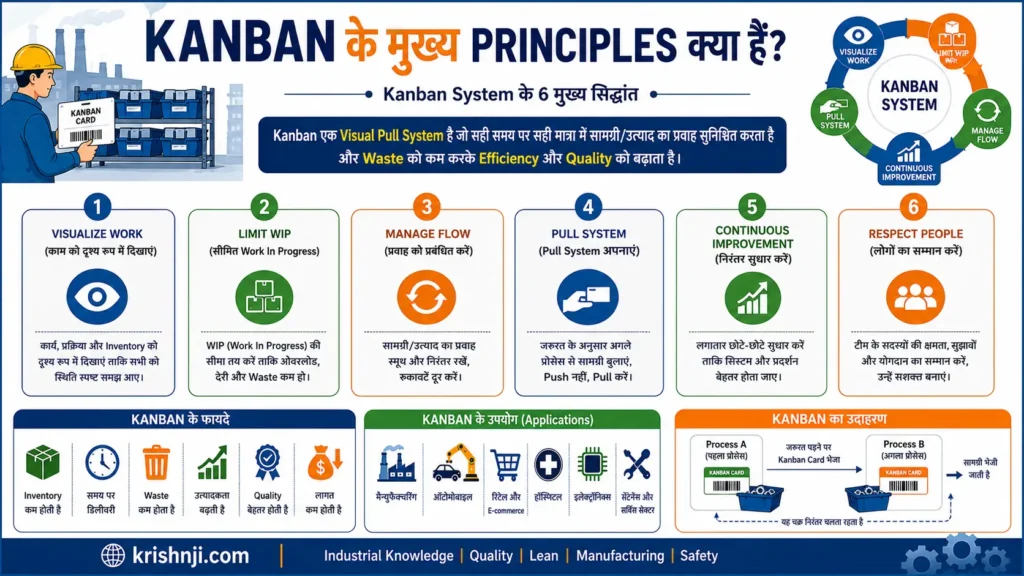
1. Work को Visualize करें
काम या material flow को ऐसी visual form में दिखाया जाता है कि उसकी वर्तमान स्थिति आसानी से समझ आ सके।
उदाहरण:
To Do → In Progress → Testing → Done
Manufacturing में इसे:
Raw Material → Processing → Assembly → Inspection → Finished Goods
के रूप में दिखाया जा सकता है।
Kanban Board, Card, Container और Digital Dashboard इसके लिए उपयोग किए जा सकते हैं।
2. WIP को Limit करें
WIP (Work in Progress) का अर्थ है वह काम या material जो अभी process में है लेकिन पूरा नहीं हुआ है।
Kanban में WIP Limit निर्धारित करके एक साथ बहुत अधिक work शुरू करने से बचा जाता है।
उदाहरण:
Assembly WIP Limit = 3
अगर Assembly में पहले से 3 jobs हैं, तो नई job को तुरंत process में डालने के बजाय existing work को आगे बढ़ाने पर ध्यान दिया जाता है।
इससे:
- Overloading कम होता है
- Bottlenecks दिखाई देते हैं
- Multitasking कम होती है
- Flow बेहतर हो सकता है
3. Flow को Manage करें
Kanban का लक्ष्य केवल ज्यादा काम शुरू करना नहीं, बल्कि काम को system के माध्यम से smoothly flow कराना है।
इसमें विशेष रूप से देखा जाता है:
- कहाँ queue बन रही है?
- कहाँ bottleneck है?
- कहाँ work रुक रहा है?
- किस process का cycle time ज्यादा है?
- कहाँ capacity कम है?
महत्वपूर्ण KPIs:
Lead Time, Cycle Time, Throughput और WIP
4. Policies को स्पष्ट रखें
Kanban system में यह स्पष्ट होना चाहिए कि:
- कौन-सा काम कब शुरू होगा?
- Kanban signal कब generate होगा?
- कितनी quantity replenish करनी है?
- WIP Limit कितनी है?
- Priority कैसे तय होगी?
- काम कब “Done” माना जाएगा?
इन rules को सभी संबंधित लोगों के लिए स्पष्ट और आसानी से उपलब्ध रखना चाहिए।
5. Pull System को अपनाएँ
Kanban का महत्वपूर्ण principle है कि काम या material को आवश्यकता के आधार पर pull किया जाए, केवल अनुमान के आधार पर push नहीं किया जाए।
Push:
Production Plan → Produce → Store → Next Process
Pull:
Demand → Consumption → Signal → Replenishment
Manufacturing में यह approach unnecessary production और excess inventory को नियंत्रित करने में मदद कर सकती है।
6. Continuous Improvement करें
Kanban system को एक बार implement करके छोड़ना नहीं चाहिए।
Team को लगातार देखना चाहिए:
“Flow को और बेहतर कैसे बनाया जा सकता है?”
इसके लिए bottlenecks, delays, quality issues, WIP और lead time का analysis किया जाता है।
इसी continuous improvement approach से Kanban का संबंध Kaizen और Lean Manufacturing से जुड़ता है।
Kanban Principles — एक नज़र में
| Principle | मुख्य उद्देश्य |
|---|---|
| Visualize Work | Work Flow को स्पष्ट बनाना |
| Limit WIP | Excess Work को नियंत्रित करना |
| Manage Flow | Smooth और Fast Flow बनाना |
| Explicit Policies | Rules और Process को स्पष्ट करना |
| Pull System | आवश्यकता के अनुसार Work/Material चलाना |
| Continuous Improvement | Process को लगातार बेहतर बनाना |
एक महत्वपूर्ण बात
Kanban को केवल “Board पर Cards लगाना” नहीं समझना चाहिए। इसका वास्तविक उद्देश्य visualization + WIP control + pull + flow management + continuous improvement को एक साथ उपयोग करके system को अधिक responsive और efficient बनाना है।
Manufacturing में यही principles Lean Manufacturing, JIT और material replenishment के साथ मिलकर Kanban को एक practical production-control approach बनाते हैं।
Kanban System के मुख्य Components कौन-कौन से हैं?
Kanban System कई visual और operational components का संयोजन है, जो demand के अनुसार work या material को pull, replenish और control करने में मदद करते हैं। इसके प्रमुख components में Kanban Card, Kanban Board, WIP Limit, Kanban Signal, Supermarket, Work Process, Replenishment Rules और Visual Policies शामिल हैं। Manufacturing में इनका उपयोग material flow और inventory को नियंत्रित करने के लिए किया जाता है।
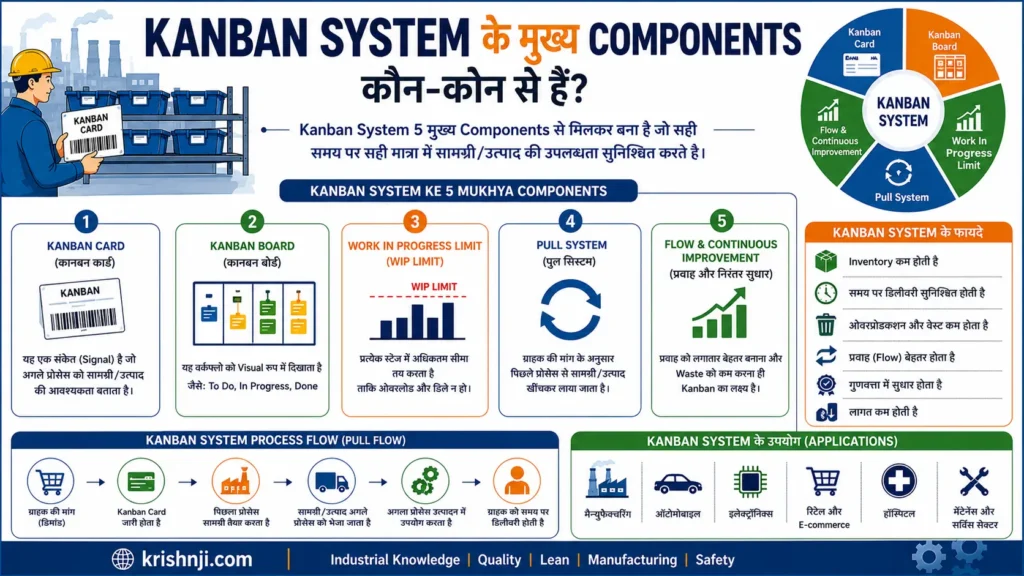
Kanban System के मुख्य Components
| Component | क्या काम करता है? | Manufacturing Example |
|---|---|---|
| Kanban Card | आवश्यकता या replenishment का signal देता है | 20 Components की आवश्यकता |
| Kanban Board | Work/Process की स्थिति visual करता है | To Do → In Process → Done |
| Kanban Signal | Pull या replenishment trigger करता है | Empty Container / QR Code |
| WIP Limit | एक समय में Work की मात्रा सीमित करता है | Assembly में अधिकतम 3 Jobs |
| Supermarket | Standard quantity का controlled inventory point | Production Line के पास Components |
| Work Process | जहाँ actual work/material processing होता है | Cutting → Assembly → Testing |
| Replenishment Rule | कब और कितनी मात्रा replenish करनी है, तय करता है | 20 pieces consume होने पर refill |
| Visual Policies | Process के rules और conditions स्पष्ट करता है | Priority, WIP Limit, Done Criteria |
| Pull System | Downstream demand के आधार पर work/material खींचता है | Assembly → Store → Supplier |
| Metrics/KPIs | System के performance को measure करते हैं | WIP, Lead Time, Cycle Time |
1. Kanban Card
Kanban Card एक visual signal है जो बताता है कि किसी material, component या work की आवश्यकता है।
एक manufacturing Kanban card में सामान्यतः हो सकता है:
- Part Number
- Part Name
- Quantity
- Source Location
- Destination Location
- Container Number
- Kanban ID
- Replenishment Information
उदाहरण:
Part: Battery Connector
Quantity: 20
From: Material Supermarket
To: Assembly Line
2. Kanban Board
Kanban Board workflow को visual रूप में दिखाता है।
Software environment में:
Backlog → To Do → In Progress → Testing → Done
Manufacturing environment में:
Material Available → Production → Inspection → Finished
Board का उद्देश्य यह समझना है कि काम कहाँ है और कहाँ रुक रहा है।
3. Kanban Signal
Kanban का मूल आधार Signal है।
Signal कई रूपों में हो सकता है:
- Card
- Empty Container
- Bin
- Barcode
- QR Code
- Electronic Signal
- Digital Kanban
Signal का अर्थ है:
“अब इस quantity को replenish करने की आवश्यकता है।”
4. WIP Limit
WIP Limit तय करती है कि किसी process में एक समय पर अधिकतम कितना work हो सकता है।
उदाहरण:
Assembly WIP Limit = 3
यदि 3 jobs पहले से process में हैं, तो चौथी job को तुरंत push करने के बजाय existing work को आगे बढ़ाने पर focus किया जाता है।
इससे bottleneck और process overload दिखाई देने लगते हैं।
5. Supermarket
Manufacturing Kanban में Supermarket एक controlled inventory location होती है जहाँ downstream process के लिए निर्धारित quantity में material उपलब्ध रहता है।
जब downstream process material consume करती है:
Consumption → Kanban Signal → Replenishment
इससे material availability और inventory control के बीच balance बनाने में मदद मिलती है।
6. Work Process
यह actual process है जहाँ material या work आगे बढ़ता है।
उदाहरण:
Raw Material → Machining → Assembly → Inspection → Finished Goods
Kanban यह सुनिश्चित करने में मदद करता है कि एक process से दूसरे process तक work/material demand और available capacity के अनुसार flow करे।
7. Replenishment Rules
Kanban System में यह स्पष्ट होना चाहिए:
- कब replenish करना है?
- कितनी quantity replenish करनी है?
- कौन replenish करेगा?
- कहाँ से material आएगा?
- signal किस process को जाएगा?
उदाहरण:
20 components consume → Kanban signal → 20 components replenish
8. Visual Policies
Kanban system के rules स्पष्ट और सभी के लिए visible होने चाहिए।
जैसे:
- WIP Limit = 3
- Batch Quantity = 20
- Priority Rule = FIFO
- Inspection Required = Yes
- Replenishment Trigger = Empty Container
इससे operator और supervisor को अलग-अलग interpretation करने की जरूरत नहीं पड़ती।
9. Pull System
यह Kanban का operating mechanism है।
Push System:
Production Plan → Produce → Inventory → Next Process
Pull System:
Demand → Consumption → Signal → Replenishment
इसलिए Kanban System में production या replenishment को downstream requirement से trigger किया जाता है।
10. Kanban KPIs
Kanban System की effectiveness measure करने के लिए कुछ महत्वपूर्ण metrics हैं:
- WIP
- Lead Time
- Cycle Time
- Throughput
- Queue Time
- Inventory Level
- Stockout Rate
- On-Time Delivery
इन metrics से पता चलता है कि system में flow वास्तव में improve हो रहा है या केवल board/card का उपयोग हो रहा है।
Kanban System को एक Flow में समझें
Demand
↓
Kanban Signal
↓
Material/Work Pull
↓
Process
↓
Consumption
↓
Replenishment
↓
Kanban Signal फिर Generate
इस तरह Kanban Card/Signal + Board + WIP Limit + Supermarket + Pull + Replenishment Rules मिलकर एक complete Kanban system को operate करने में मदद करते हैं।
Kanban Board क्या है और यह कैसे काम करता है?
Kanban Board एक Visual Management Tool है, जो काम या material की वर्तमान स्थिति को अलग-अलग stages में दिखाता है। इसका उपयोग workflow को visualize करने, WIP (Work in Progress) को नियंत्रित करने, bottlenecks पहचानने और work को एक process से दूसरे process तक व्यवस्थित रूप से flow कराने के लिए किया जाता है। यह physical board या digital software दोनों रूपों में हो सकता है।
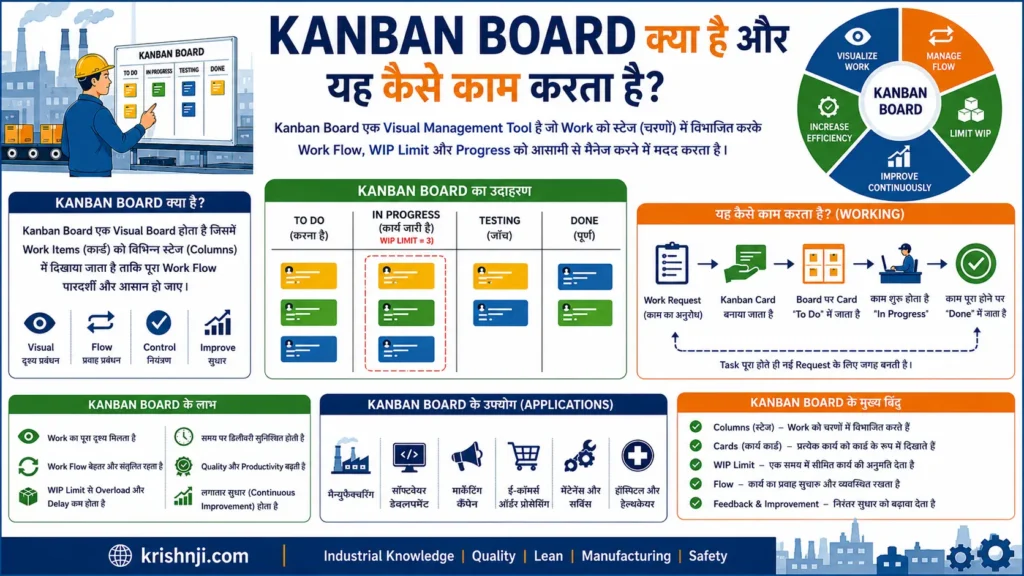
Kanban Board का Basic Structure
एक सामान्य Kanban Board में workflow को अलग-अलग columns में बाँटा जाता है:
Backlog → To Do → In Progress → Testing → Done
हर काम को एक Kanban Card के रूप में board पर रखा जाता है। जैसे-जैसे काम आगे बढ़ता है, card को संबंधित column में move किया जाता है।
Kanban Board कैसे काम करता है?
1. Work को Board पर Visualize किया जाता है
सभी pending और ongoing tasks को cards के रूप में board पर रखा जाता है।
2. Work को अलग-अलग stages में बाँटा जाता है
उदाहरण:
| To Do | In Progress | Testing | Done |
|---|---|---|---|
| Job 4 | Job 2 | Job 1 | Job 5 |
| Job 6 | Job 3 | Job 7 |
इससे तुरंत पता चलता है कि कौन-सा काम किस stage में है।
3. WIP Limit निर्धारित की जाती है
मान लीजिए In Progress की WIP Limit = 2 है। इसका अर्थ है कि एक समय में अधिकतम 2 jobs ही इस stage में हो सकती हैं।
अगर वहाँ पहले से 2 jobs हैं, तो नई job शुरू करने के बजाय existing jobs को आगे बढ़ाने पर focus किया जाता है।
4. Work को Pull किया जाता है
जब अगली stage में capacity उपलब्ध होती है, तो पिछली stage से नया काम pull किया जाता है।
इससे केवल अधिक से अधिक काम शुरू करने के बजाय काम के smooth flow पर focus रहता है।
5. Bottlenecks दिखाई देते हैं
यदि किसी column में लगातार cards जमा हो रहे हैं, तो यह संकेत हो सकता है कि उस process में bottleneck है।
उदाहरण:
To Do (2) → Assembly (2) → Testing (8) → Done (1)
यहाँ Testing में cards का जमा होना capacity या process problem का संकेत हो सकता है।
6. Continuous Improvement किया जाता है
Team board देखकर identify करती है:
- कहाँ work रुक रहा है?
- किस process की capacity कम है?
- WIP कहाँ बढ़ रहा है?
- Lead Time क्यों बढ़ रहा है?
- कौन-सा bottleneck बार-बार आ रहा है?
फिर process में improvement किया जाता है।
Manufacturing में Kanban Board का Example
Factory में Kanban Board software tasks के बजाय material और production stages को भी represent कर सकता है।
उदाहरण:
Material Required → Material Available → Production → Inspection → Completed
मान लीजिए Assembly Line को किसी component की आवश्यकता है। Kanban signal generate होने पर material requirement board पर दिखाई देती है।
इसके बाद:
Material Request → Picking → Line Supply → Consumption → Replenishment
इससे production team को material की स्थिति आसानी से दिखाई देती है।
Physical और Digital Kanban Board में अंतर (तालिका)
| Feature | Physical Kanban Board | Digital Kanban Board |
|---|---|---|
| Format | Whiteboard/Card | Software/App |
| Updates | Manual | Manual/Automated |
| Visibility | Local | Remote/Multiple Locations |
| Data Analysis | Limited | बेहतर |
| Barcode/QR Integration | Limited | संभव |
| Dashboard | सामान्यतः नहीं | उपलब्ध |
| Industry 4.0 Integration | कम | अधिक |
Kanban Board और Kanban System में अंतर
इन दोनों को एक जैसा समझना सही नहीं है।
Kanban System एक व्यापक Pull और Flow Management approach है।
Kanban Board उस system या workflow को visualize और manage करने का एक tool है।
इसलिए:
Kanban Board = Visualization Tool
Kanban System = Pull + Flow + WIP Control + Replenishment + Continuous Improvement
सरल उदाहरण
मान लीजिए battery manufacturing line पर 4 stages हैं:
Material → Assembly → Testing → Finished
अगर Testing stage की capacity कम है और वहाँ लगातार cards जमा हो रहे हैं, तो Kanban Board तुरंत bottleneck को visual बना देगा।
इससे team केवल और ज्यादा production करने के बजाय Testing capacity और overall flow सुधारने पर ध्यान दे सकती है।
यही Kanban Board की सबसे महत्वपूर्ण उपयोगिता है—काम कहाँ है, कहाँ रुक रहा है और कहाँ सुधार की आवश्यकता है, इसे एक नज़र में समझना।
Kanban Card क्या है और इसमें कौन-कौन सी जानकारी होती है?
Kanban Card एक Visual Signal है, जो किसी material, component या work की आवश्यकता, movement या replenishment की सूचना देता है। Manufacturing में Kanban Card का उपयोग यह बताने के लिए किया जाता है कि कौन-सा material चाहिए, कितनी quantity चाहिए, कहाँ से लेना है और कहाँ पहुँचाना है। यह physical card या digital form में हो सकता है।
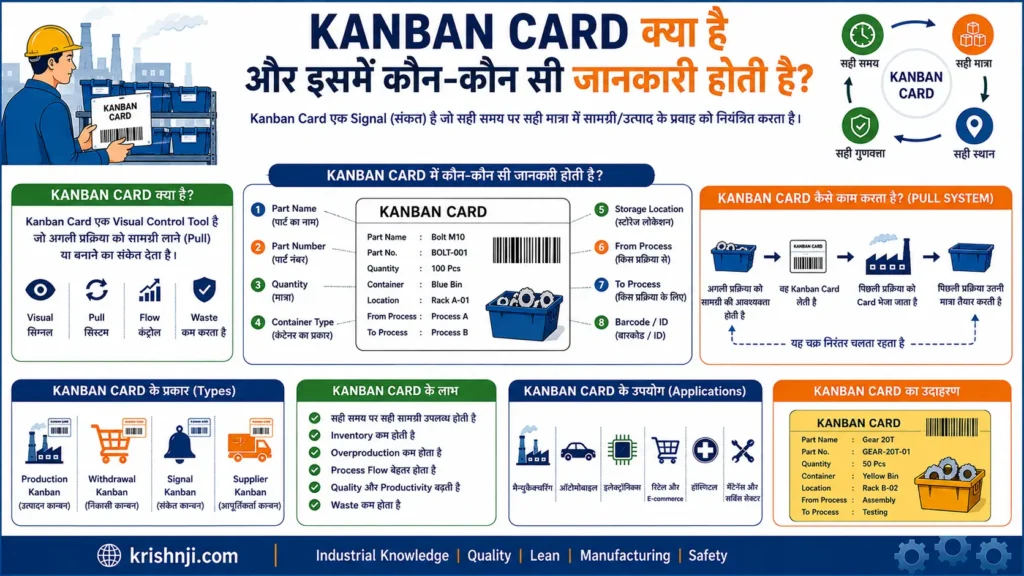
Kanban Card कैसे काम करता है?
Kanban Card का basic logic है:
Material/Work Consume → Kanban Signal → Replenishment → Material/Work Supply
उदाहरण के लिए, यदि Assembly Line से 20 components का एक container खाली हो जाता है, तो उससे जुड़ा Kanban Card material store या upstream process को signal देता है कि 20 components replenish करने हैं।
Kanban Card में कौन-कौन सी जानकारी होती है?
Kanban Card की information organization और process के अनुसार अलग हो सकती है, लेकिन Manufacturing में सामान्यतः ये details रखी जाती हैं:
| जानकारी | उद्देश्य |
|---|---|
| Kanban ID | Card को uniquely identify करना |
| Part Number | Component की पहचान |
| Part Name | Component का नाम |
| Quantity | कितनी quantity चाहिए |
| Container Size | एक container में कितने pieces हैं |
| Source Location | Material कहाँ से आएगा |
| Destination Location | Material कहाँ जाना है |
| Process Name | किस process को material चाहिए |
| Supplier/Source | Material कौन supply करेगा |
| Replenishment Point | कब material replenish करना है |
| Priority | आवश्यकता की प्राथमिकता |
| Barcode/QR Code | Digital tracking और scanning |
| Date/Time | Signal या transaction का समय |
| Status | Pending, In Process, Completed आदि |
एक Simple Manufacturing Kanban Card Example
मान लीजिए Assembly Line को Battery Connector चाहिए:
| Field | Example |
|---|---|
| Kanban ID | KB-025 |
| Part No. | BC-1025 |
| Part Name | Battery Connector |
| Quantity | 20 Pieces |
| Container | 1 Bin |
| From | Material Supermarket |
| To | Assembly Line-01 |
| Process | Battery Assembly |
| Signal | Replenishment |
| QR Code | Digital Tracking |
जब 20 pieces consume हो जाते हैं, तो यह Kanban signal upstream material area को भेजा जाता है और उसी standard quantity को replenish किया जाता है।
Kanban Card के मुख्य प्रकार कौन से है?
Manufacturing में Kanban Cards को उनके purpose के अनुसार अलग-अलग प्रकार से इस्तेमाल किया जा सकता है।
1. Production Kanban
यह signal देता है कि किसी component या product की नई quantity produce करनी है।
Example:
20 components consume → Production Kanban → 20 components produce.
2. Withdrawal Kanban
यह signal देता है कि एक process को दूसरे location से material withdraw/pull करना है।
Example:
Assembly → Material Supermarket
Assembly को material चाहिए → Withdrawal Kanban → Store से material लिया जाता है।
3. Supplier Kanban
Supplier को signal देता है कि निर्धारित quantity में material replenish/supply करना है।
4. Electronic Kanban
Traditional paper card की जगह:
- Barcode
- QR Code
- RFID
- ERP/MES signal
- Digital Kanban software
का उपयोग किया जाता है।
Kanban Card और Kanban Board में अंतर (तालिका)
| Kanban Card | Kanban Board |
|---|---|
| Individual work/material का signal | पूरे workflow का visual representation |
| एक specific task/material को represent करता है | कई cards को एक साथ दिखाता है |
| Quantity और location जैसी जानकारी रख सकता है | Process stages दिखाता है |
| Pull/Replenishment trigger कर सकता है | Flow और bottleneck visualize करता है |
| Physical या Digital | Physical या Digital |
सरल शब्दों में:
Kanban Card बताता है “क्या चाहिए, कितना चाहिए और कहाँ चाहिए”, जबकि Kanban Board बताता है “काम या material अभी किस stage में है।”
महत्वपूर्ण बात
Kanban Card का उद्देश्य केवल information लिखना नहीं है। यह Pull System का Visual Signal है। जब कोई material या work consume होता है, तो card या उसका digital equivalent upstream process को आवश्यकता का signal देता है। इसी कारण Kanban Card JIT, Material Replenishment और Lean Manufacturing में महत्वपूर्ण भूमिका निभाता है।
यह भी पढ़ें…..
Kanban में WIP Limit क्या है और यह क्यों महत्वपूर्ण है?
WIP Limit (Work in Progress Limit) Kanban में किसी workflow या process stage में एक समय पर मौजूद work की अधिकतम सीमा है। इसका उद्देश्य बहुत अधिक काम एक साथ शुरू होने से रोकना, bottlenecks को जल्दी पहचानना और work flow को smooth बनाना है। Manufacturing में WIP Limit excess inventory और process congestion को नियंत्रित करने में भी मदद करती है।
WIP का मतलब क्या है?
WIP = Work in Progress
अर्थात वह work जो शुरू हो चुका है लेकिन अभी पूरा नहीं हुआ है।
Manufacturing में WIP में शामिल हो सकते हैं:
- Process में मौजूद components
- Semi-finished products
- Assembly में लगे products
- Inspection की waiting quantity
- अगली process की प्रतीक्षा कर रहे parts
WIP Limit कैसे काम करती है?
मान लीजिए किसी Assembly Process की:
WIP Limit = 3
इसका अर्थ है कि एक समय पर Assembly stage में अधिकतम 3 jobs/units हो सकती हैं।
अगर स्थिति यह है:
| Stage | WIP Limit | Current WIP |
|---|---|---|
| Material Preparation | 4 | 3 |
| Assembly | 3 | 3 |
| Testing | 2 | 1 |
Assembly की limit पूरी हो चुकी है।
अब नई job को Assembly में push करने के बजाय पहले मौजूदा jobs में से किसी एक को आगे बढ़ाना होगा।
यही Kanban का महत्वपूर्ण विचार है:
Stop Starting, Start Finishing.
अर्थात नया काम शुरू करने से पहले existing work को पूरा करने और आगे flow कराने पर ध्यान दें।
WIP Limit क्यों महत्वपूर्ण है?
1. Bottlenecks को पहचानने में मदद करती है
यदि किसी process में लगातार WIP जमा हो रहा है, तो यह संकेत हो सकता है कि उस process में bottleneck है।
उदाहरण:
Assembly → Testing
अगर Assembly से लगातार 10 units Testing में जा रहे हैं लेकिन Testing की capacity केवल 5 units की है, तो Testing के सामने WIP बढ़ने लगेगा।
Kanban Board पर यह समस्या तुरंत दिखाई दे सकती है।
2. Overproduction को नियंत्रित करती है
बिना WIP control के upstream process अपनी maximum capacity पर production करता रह सकता है, भले ही downstream process उसे process न कर पाए।
WIP Limit इस तरह के unnecessary production को रोकने में मदद करती है।
3. Workflow को Smooth बनाती है
WIP कम और controlled होने पर work के एक stage में लंबे समय तक रुके रहने की संभावना कम हो सकती है।
इससे:
Less Queue → Less Waiting → Better Flow
का लक्ष्य हासिल करने में मदद मिलती है।
4. Lead Time कम करने में मदद करती है
बहुत अधिक WIP का अर्थ अक्सर ज्यादा waiting और queue होता है।
WIP को नियंत्रित करने से:
Waiting Time ↓ → Lead Time ↓
हो सकता है।
हालाँकि WIP Limit अपने आप Lead Time कम करने की guarantee नहीं देती; सही limit और balanced process capacity भी आवश्यक है।
5. Multitasking कम करती है
यदि किसी व्यक्ति या machine के सामने बहुत सारे jobs खुले हों, तो बार-बार job बदलने से productivity और flow प्रभावित हो सकता है।
WIP Limit team को कम काम शुरू करके उसे पूरा करने पर focus करने में मदद करती है।
6. Quality Problems को जल्दी दिखा सकती है
अगर किसी process के बाद WIP लगातार बढ़ रहा है, तो समस्या केवल capacity की नहीं हो सकती।
संभावित कारण:
- Quality issue
- Machine downtime
- Inspection delay
- Material shortage
- Manpower shortage
- Process imbalance
इसलिए WIP एक early warning signal की तरह भी काम कर सकता है।
Manufacturing में WIP Limit का Example
मान लीजिए battery manufacturing line में:
Assembly → Leak Testing → Final Inspection
और limits हैं:
| Process | WIP Limit |
|---|---|
| Assembly | 5 |
| Leak Testing | 3 |
| Final Inspection | 2 |
अगर Final Inspection में पहले से 2 units मौजूद हैं, तो Assembly से लगातार और units push करने के बजाय flow को check करना जरूरी होगा।
क्योंकि समस्या संभवतः Final Inspection capacity में हो सकती है।
इससे team पूछ सकती है:
“Final Inspection में units क्यों रुक रहे हैं?”
और फिर root cause investigate किया जा सकता है।
WIP Limit और Pull System का संबंध क्या है?
WIP Limit और Pull System एक-दूसरे को support करते हैं।
Downstream Capacity Available
↓
Work Pull किया जाता है
↓
WIP Limit के अंदर Work Process होता है
↓
Work Complete होता है
↓
अगला Work Pull होता है
इसका उद्देश्य यह है कि system में जरूरत से ज्यादा work push न हो।
WIP Limit कैसे निर्धारित करें?
एक fixed universal number सभी processes के लिए सही नहीं होता।
WIP Limit निर्धारित करते समय देखें:
- Process Capacity
- Cycle Time
- Demand
- Number of Operators
- Machine Capacity
- Process Variation
- Downstream Capacity
- Bottleneck
- Required Service Level
पहले एक practical limit निर्धारित करके actual performance observe करना और फिर data के आधार पर उसे adjust करना बेहतर approach है।
WIP Limit के लिए महत्वपूर्ण KPIs
WIP Limit लागू करने के बाद इन metrics को monitor किया जा सकता है:
| KPI | क्या बताता है? |
|---|---|
| WIP | Process में कितना work है |
| Lead Time | Work को पूरा होने में कितना समय लगा |
| Cycle Time | Actual processing time |
| Throughput | कितनी units/work complete हुई |
| Queue Time | Work ने कितना समय wait किया |
| Bottleneck Frequency | कितनी बार process में blockage हुआ |
सरल भाषा में समझें
अगर किसी factory में 100 units एक साथ process में डाल दी जाएँ, तो जरूरी नहीं कि production जल्दी पूरा हो जाएगा। इससे queues, congestion और waiting बढ़ सकती है।
Kanban का WIP Limit principle कहता है:
एक साथ सीमित मात्रा में work process करें, bottleneck को पहचानें और existing work को पूरा करके आगे flow कराएँ।
यही कारण है कि WIP Limit Kanban के सबसे महत्वपूर्ण operational controls में से एक है।
Kanban Pull System क्या है?
Kanban Pull System एक ऐसी production और workflow approach है जिसमें काम या material को अगले process की वास्तविक आवश्यकता के आधार पर “pull” किया जाता है, न कि केवल अनुमान या production plan के आधार पर पहले से “push” किया जाता है। Kanban signal, card, container या digital signal downstream demand को upstream process तक पहुँचाता है और replenishment को trigger करता है।
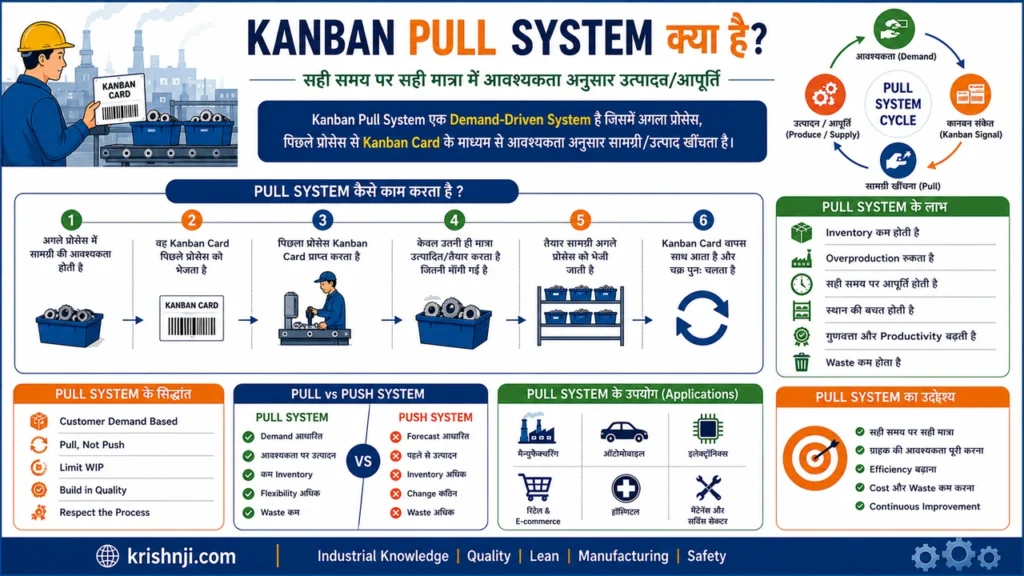
सरल भाषा में Kanban Pull System
इसका मूल नियम है:
“पहले आवश्यकता या consumption हो, फिर signal मिले और उसके बाद उतना ही work या material replenish किया जाए जितना आवश्यक है।”
इसका basic flow है:
Customer Demand
↓
Consumption / Requirement
↓
Kanban Signal
↓
Material / Work Pull
↓
Replenishment
↓
Next Process को Supply
Push और Pull System में अंतर (तालिका)
| Push System | Kanban Pull System |
|---|---|
| Production plan के आधार पर work आगे भेजा जाता है | Actual demand के आधार पर work pull किया जाता है |
| पहले produce, बाद में consume | पहले consume, फिर replenish |
| Excess production का risk अधिक | Overproduction को नियंत्रित करने में मदद |
| Inventory बढ़ सकती है | Inventory को controlled रखने में मदद |
| Downstream demand हमेशा trigger नहीं होती | Downstream process signal देती है |
| Forecast-driven हो सकता है | Consumption-driven होता है |
Manufacturing Example
मान लीजिए एक battery assembly line को एक component के 20 pieces चाहिए।
Assembly line में 20 pieces consume होने के बाद खाली container या Kanban Card material supermarket को signal देता है:
20 Pieces Consume
↓
Kanban Signal
↓
Material Store को Request
↓
20 Pieces Replenish
↓
Assembly Line को Supply
यहाँ material store ने अपनी इच्छा से 100 या 200 pieces production area में नहीं भेजे। Actual consumption ने replenishment को trigger किया।
Kanban Pull System के मुख्य Components कौन से है?
1. Demand
Downstream process या customer की वास्तविक आवश्यकता Pull System का starting point है।
2. Kanban Signal
Signal यह बताता है कि material या work की आवश्यकता है।
यह हो सकता है:
- Kanban Card
- Empty Container
- Barcode
- QR Code
- RFID
- Electronic Kanban Signal
3. Pull
Downstream process आवश्यक work/material को upstream process से pull करती है।
4. Replenishment
जो quantity consume हुई है, उसे निर्धारित नियम के अनुसार replenish किया जाता है।
5. WIP Limit
WIP Limit system में एक साथ मौजूद work को नियंत्रित करती है, जिससे excessive WIP और congestion कम करने में मदद मिलती है।
Kanban Pull System और JIT का संबंध क्या है?
Kanban Pull System Just in Time (JIT) को operationalize करने में मदद करता है।
JIT का लक्ष्य:
सही material → सही मात्रा → सही समय → सही स्थान
Kanban का काम:
इस requirement के लिए visual pull/replenishment signal देना।
इसलिए सरल रूप में:
JIT एक production philosophy/approach है, जबकि Kanban एक महत्वपूर्ण mechanism है जो demand-based pull और replenishment को support करता है।
Kanban Pull System के लाभ क्या है?
- Overproduction को नियंत्रित करने में मदद
- Excess WIP कम करने में सहायता
- Inventory को control करने में मदद
- Material Flow बेहतर करना
- Bottlenecks को visual बनाना
- Lead Time कम करने में सहायता
- Production को actual demand के साथ align करना
- Replenishment process को standardized बनाना
एक लाइन में समझें
Push System:Plan → Produce → Push → Inventory
Kanban Pull System:Demand → Consume → Signal → Pull → Replenish
यही Kanban का मूल विचार है—काम या material को केवल इसलिए आगे न भेजें कि वह उपलब्ध है; उसे तब pull करें जब downstream process को उसकी आवश्यकता हो।
Kanban के Types कौन-कौन से हैं?
Kanban के Types उसके उपयोग और signal के उद्देश्य के आधार पर अलग-अलग होते हैं। Manufacturing में मुख्य रूप से Production Kanban, Withdrawal Kanban, Supplier Kanban और Signal Kanban का उपयोग किया जाता है। Modern factories में इनके digital रूप जैसे e-Kanban भी उपयोग किए जाते हैं। अलग-अलग Kanban types का उद्देश्य production, material movement और replenishment को Pull System के अनुसार नियंत्रित करना है।
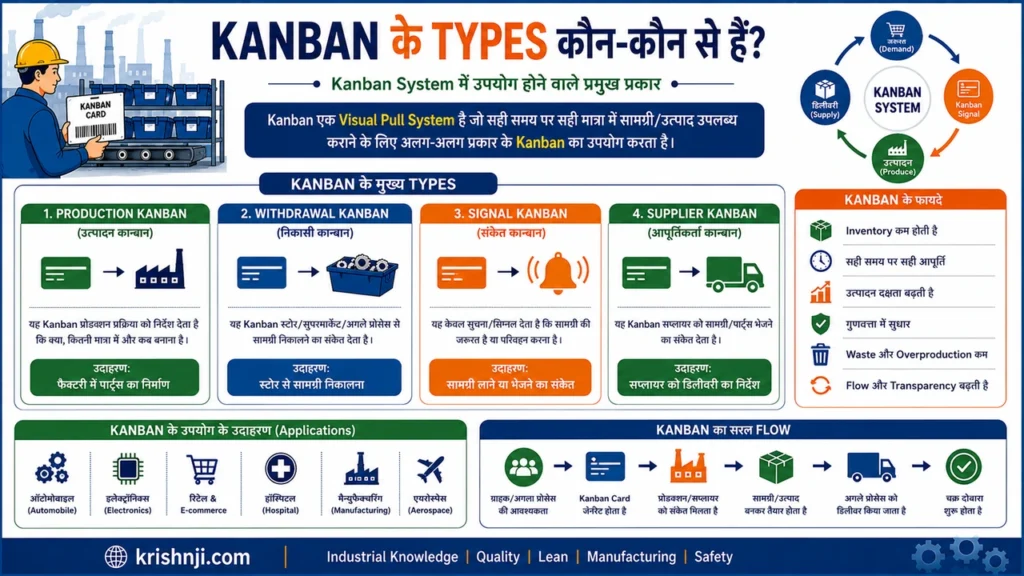
Kanban के प्रमुख Types (तालिका)
| Kanban Type | मुख्य उद्देश्य | सामान्य उपयोग |
|---|---|---|
| Production Kanban | क्या और कितनी quantity produce करनी है, इसका signal | Production Line |
| Withdrawal Kanban | Material को कहाँ से और कितनी मात्रा में लेना है | Store → Production |
| Supplier Kanban | Supplier को material replenish करने का signal | Supplier → Factory |
| Signal Kanban | Batch/production trigger का signal | Batch Production |
| Conveyance Kanban | Material movement/transfer का signal | Process → Process |
| Emergency Kanban | Unexpected shortage या urgent requirement को handle करना | Critical Material |
| Electronic Kanban (e-Kanban) | Digital तरीके से Kanban signal और tracking | Smart Factory / Industry 4.0 |
1. Production Kanban
Production Kanban upstream production process को यह signal देता है कि किसी product या component की निर्धारित quantity produce करनी है।
उदाहरण:
Assembly Line से 20 components consume हुए।
Consumption → Production Kanban → Upstream Process → 20 Components Produce
इसका मुख्य उद्देश्य overproduction को नियंत्रित करते हुए demand के अनुसार production करना है।
2. Withdrawal Kanban
Withdrawal Kanban को Material Kanban या Conveyance Kanban के context में भी समझा जा सकता है। इसका उद्देश्य किसी downstream process को upstream location से material withdraw/pull करने का signal देना है।
उदाहरण:
Assembly Line → Material Supermarket
Assembly को 20 components चाहिए → Withdrawal Kanban → Store से 20 components उठाए जाते हैं।
यह Kanban मुख्य रूप से material movement और replenishment को control करता है।
3. Supplier Kanban
Supplier Kanban factory और external supplier के बीच material replenishment को control करने के लिए उपयोग किया जाता है।
उदाहरण:
Factory Material Store → Supplier
Material निर्धारित reorder point तक पहुँचता है → Kanban signal supplier को जाता है → supplier agreed quantity में material supply करता है।
इससे supplier deliveries को actual consumption के साथ synchronize करने में मदद मिल सकती है।
4. Signal Kanban
Signal Kanban तब उपयोगी होता है जब production या replenishment को किसी निश्चित quantity/batch के आधार पर trigger करना हो।
इसे अक्सर:
- Batch Production
- Lot Production
- Reorder Point
- Minimum Stock Level
जैसे situations में उपयोग किया जा सकता है।
उदाहरण:
जब supermarket inventory निर्धारित level तक पहुँच जाए, तो Signal Kanban नई production batch शुरू करने का संकेत देता है।
5. Conveyance Kanban
Conveyance Kanban का उद्देश्य material को एक location/process से दूसरी location/process तक move या transfer करने का signal देना है।
उदाहरण:
Raw Material Store → Machining → Assembly
जब Assembly को material चाहिए, Conveyance Kanban material handler को निर्धारित quantity transfer करने का signal देता है।
6. Emergency Kanban
Emergency Kanban सामान्य Kanban flow का replacement नहीं है। इसका उपयोग unexpected situations में किया जा सकता है, जैसे:
- अचानक material shortage
- defective material
- machine breakdown के बाद urgent requirement
- unexpected demand
इसे regular Kanban के बजाय exception handling mechanism की तरह देखना चाहिए।
7. Electronic Kanban (e-Kanban)
Traditional paper/card-based Kanban की जगह digital technologies का उपयोग करके e-Kanban system बनाया जा सकता है।
इसमें:
- Barcode
- QR Code
- RFID
- Sensors
- PLC
- MES
- ERP
- Digital Dashboard
जैसी technologies integrate की जा सकती हैं।
उदाहरण:
Material Consumption → Barcode/Scanner → ERP/MES → e-Kanban Signal → Replenishment
यह approach Industry 4.0 environment में real-time visibility और automated replenishment को support कर सकती है।
Production Kanban और Withdrawal Kanban में अंतर (तालिका)
| आधार | Production Kanban | Withdrawal Kanban |
|---|---|---|
| मुख्य उद्देश्य | Production का signal | Material withdrawal का signal |
| Signal किसे मिलता है? | Production Process | Material Handler/Upstream Store |
| मुख्य सवाल | क्या और कितना बनाना है? | कहाँ से और कितना लेना है? |
| उपयोग | Production Control | Material Movement |
| Example | 20 connectors produce करें | Store से 20 connectors लाएँ |
Kanban Types को एक Flow में समझें
एक Manufacturing System में कई Kanban types एक साथ काम कर सकते हैं:
Customer Demand
↓
Production Kanban
↓
Production Process
↓
Finished/Intermediate Inventory
↓
Withdrawal Kanban
↓
Downstream Process
↓
Supplier Kanban
↓
Supplier Replenishment
इस तरह अलग-अलग Kanban signals Production, Material Movement और Replenishment को एक Pull-based flow में जोड़ सकते हैं।
महत्वपूर्ण बात
हर factory में Kanban Types की naming और classification बिल्कुल समान नहीं होती। अलग-अलग organizations अपनी production system, material flow और control rules के अनुसार terminology बदल सकती हैं। इसलिए Kanban के Types को fixed universal list की बजाय उनके signal और purpose के आधार पर समझना अधिक सही है।
Manufacturing में Kanban का उपयोग कैसे किया जाता है?
Manufacturing में Kanban का उपयोग Material, Work-in-Progress और Production Flow को demand के अनुसार नियंत्रित करने के लिए किया जाता है। यह Pull System के माध्यम से downstream process की वास्तविक आवश्यकता को upstream process तक signal करता है। Kanban Card, Container, Barcode, QR Code या e-Kanban जैसे signals से material replenishment और production को नियंत्रित करके excess inventory, overproduction और material shortages को कम करने में मदद मिलती है।
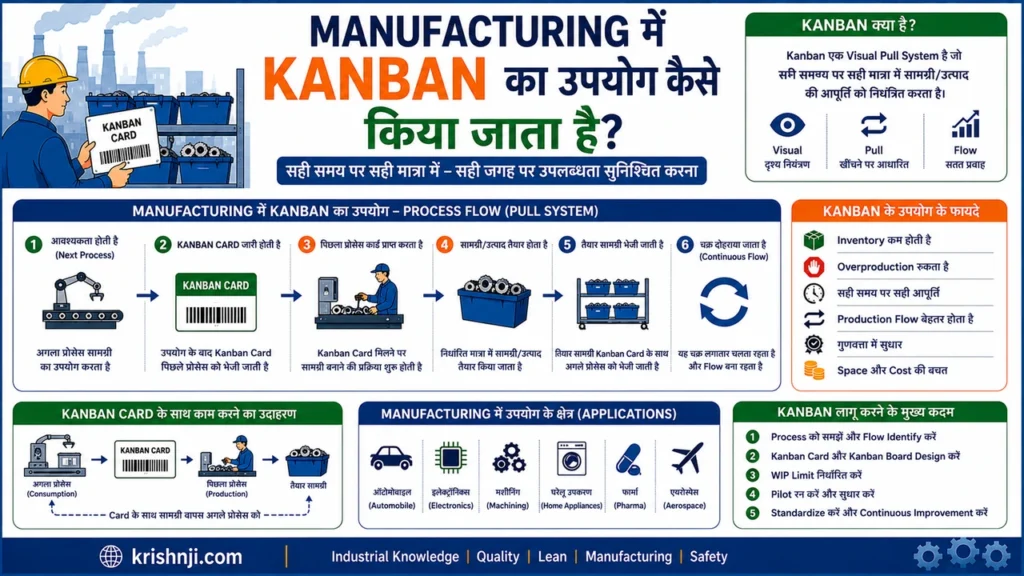
Manufacturing में Kanban का Basic Flow
Customer Demand
↓
Material/Component Consumption
↓
Kanban Signal
↓
Material Withdrawal / Production
↓
Replenishment
↓
Next Process को Supply
↓
Cycle Repeat
इसका मूल नियम है:
“जितना consume हुआ है, आवश्यकता और निर्धारित Kanban rules के अनुसार उतना ही replenish करें।”
Manufacturing में Kanban कहाँ-कहाँ उपयोग होता है?
1. Raw Material Replenishment
Production line पर material की निर्धारित quantity consume होने पर Kanban signal store या upstream process को भेजा जाता है।
उदाहरण:
20 components consume → Kanban Signal → Store → 20 components replenish
इससे production area में unnecessary material accumulation को नियंत्रित किया जा सकता है।
2. Work-in-Progress (WIP) Control
Manufacturing में अलग-अलग processes के बीच बहुत अधिक semi-finished material जमा हो सकता है।
Kanban में WIP Limits निर्धारित करके यह नियंत्रित किया जा सकता है कि किसी process में एक समय पर कितना work मौजूद रहेगा।
उदाहरण:
Assembly WIP Limit = 5 units
इसका अर्थ है कि Assembly stage में निर्धारित system rule के अनुसार 5 units से अधिक work को आगे push नहीं किया जाना चाहिए।
3. Production Control
Production Kanban यह signal देता है कि:
- कौन-सा component बनाना है?
- कितनी quantity बनानी है?
- किस process के लिए बनाना है?
- कब replenish करना है?
इससे production को actual consumption और demand के साथ synchronize करने में मदद मिलती है।
4. Material Movement
एक process से दूसरे process तक material transfer करने के लिए भी Kanban signal उपयोग किया जा सकता है।
उदाहरण:
Material Supermarket → Assembly Line
Assembly में material consume हुआ → Kanban signal → Material Handler → निर्धारित quantity line पर supply।
इससे material movement को standardized बनाया जा सकता है।
5. Supermarket System
Lean Manufacturing में Supermarket एक controlled inventory point की तरह काम कर सकता है।
उदाहरण:
Component Supermarket → Assembly
Assembly से material withdraw होता है और Kanban signal के आधार पर supermarket को replenish किया जाता है।
फिर:
Supermarket Consumption → Upstream Replenishment
का cycle चलता रहता है।
Battery Manufacturing का Practical Example
मान लीजिए battery assembly line में किसी connector की आवश्यकता है।
एक Kanban container में:
Quantity = 20 Connectors
रखी गई है।
जब assembly operator 20 connectors consume कर लेता है:
Step 1: Container खाली होता है।
↓
Step 2: Empty container/Kanban card signal देता है।
↓
Step 3: Material supermarket को replenishment request मिलती है।
↓
Step 4: Material handler 20 connectors line पर लाता है।
↓
Step 5: Empty container वापस replenishment point पर जाता है।
↓
Step 6: Cycle फिर repeat होता है।
इस approach से operator को हर बार manually material requisition करने की जरूरत कम हो सकती है और standard quantity के आधार पर replenishment किया जा सकता है।
Manufacturing में Kanban के मुख्य Applications (तालिका)
| Application | Kanban का उपयोग |
|---|---|
| Raw Material | Material Replenishment |
| Production | Production Trigger |
| WIP | Work Quantity Control |
| Material Handling | Material Withdrawal/Movement |
| Assembly Line | Line-side Material Supply |
| Supermarket | Inventory Replenishment |
| Supplier | Supplier Replenishment Signal |
| Finished Goods | Demand-based Production |
| Digital Factory | e-Kanban & Real-time Tracking |
Manufacturing में Kanban Implement करने की Basic Process
Step 1: Customer Demand समझें
सबसे पहले यह determine करें कि customer या downstream process को कितना और कितनी frequency पर material/product चाहिए।
Step 2: Process Flow Map करें
Material और information flow को map करें:
Supplier → Store → Production → Assembly → Inspection → Customer
Step 3: Kanban Point निर्धारित करें
यह तय करें कि कहाँ Kanban signal generate होगा।
Step 4: Standard Quantity तय करें
प्रत्येक Kanban container/card में कितनी quantity होगी, यह निर्धारित करें।
Step 5: WIP Limit निर्धारित करें
प्रत्येक process की capacity और flow के अनुसार WIP limits निर्धारित करें।
Step 6: Kanban Signals लागू करें
Physical card, container, barcode, QR code या digital system का उपयोग किया जा सकता है।
Step 7: Pull Flow शुरू करें
Downstream consumption के आधार पर upstream replenishment किया जाए।
Step 8: Performance Monitor करें
नियमित रूप से:
- WIP
- Lead Time
- Cycle Time
- Throughput
- Inventory
- Stockouts
- On-Time Delivery
जैसे KPIs monitor करें।
Manufacturing में Kanban के लाभ क्या हैं?
सही तरीके से लागू होने पर Kanban:
- Excess Inventory को नियंत्रित करने में मदद करता है
- Overproduction कम करने में सहायता करता है
- WIP को नियंत्रित करता है
- Material Flow को Visual बनाता है
- Bottlenecks को जल्दी पहचानने में मदद करता है
- Material Availability सुधार सकता है
- Lead Time कम करने में सहायता कर सकता है
- Production और Demand को synchronize करता है
- Continuous Improvement को support करता है
लेकिन Kanban हर manufacturing environment में automatically suitable नहीं होता। Highly unstable demand, बहुत लंबे supplier lead times, unreliable processes या frequent quality/machine disruptions में Kanban लागू करने से पहले system stability और replenishment parameters पर ध्यान देना जरूरी है।
Manufacturing में Kanban को एक लाइन में समझें
Demand/Consumption → Kanban Signal → Pull → Replenishment → Consumption
यही कारण है कि Manufacturing में Kanban को केवल एक card या board नहीं, बल्कि material replenishment, production control और flow management के लिए Pull-based system के रूप में समझना अधिक सही है।
Manufacturing में Kanban का Practical Example क्या है?
Manufacturing में Kanban का practical use सबसे आसानी से material replenishment के उदाहरण से समझा जा सकता है। मान लीजिए एक battery assembly line को लगातार connectors की आवश्यकता होती है। Kanban system में fixed quantity वाले containers और Kanban signals का उपयोग करके केवल consumed material को replenish किया जाता है, जिससे line-side inventory, material shortage और unnecessary movement को नियंत्रित करने में मदद मिलती है।
Battery Assembly Line का Kanban Example
मान लीजिए Assembly Line को Battery Connector की आवश्यकता है।
Factory ने एक standard Kanban container तय किया:
- Part: Battery Connector
- Container Quantity: 20 pieces
- Supply Point: Material Supermarket
- Destination: Assembly Line
- Signal: Kanban Card / Empty Container
- Replenishment Quantity: 20 pieces
अब पूरा flow इस प्रकार होगा:
Material Supermarket
↓
20 Connectors → Assembly Line
↓
Operator Components Consume करता है
↓
Container Empty
↓
Kanban Signal
↓
Material Handler
↓
20 Connectors Replenish
↓
Assembly Line
Step-by-Step समझें
1. Standard Quantity निर्धारित की जाती है
एक container में केवल 20 connectors रखे जाते हैं।
इससे हर बार material की quantity standardized रहती है।
2. Material Line पर उपलब्ध रहता है
Assembly operator को required components line-side location पर मिलते रहते हैं।
3. Components Consume होते हैं
Production के दौरान operator connectors का उपयोग करता है।
जब container खाली हो जाता है, तो यह consumption का visual signal बन जाता है।
4. Kanban Signal Generate होता है
Empty container या Kanban Card material supermarket को signal देता है:
“20 connectors की replenishment आवश्यक है।”
5. Material Handler Replenish करता है
Material handler supermarket से निर्धारित quantity के 20 connectors लेकर Assembly Line पर पहुँचाता है।
6. Empty Container वापस जाता है
खाली container/card replenishment point पर वापस जाता है और अगला replenishment cycle शुरू हो जाता है।
पहले और Kanban के बाद का अंतर
मान लीजिए Kanban से पहले operator जरूरत पड़ने पर manually material मांगता था।
Kanban से पहले
Operator को Material चाहिए
↓
Material shortage पता चलता है
↓
Manual Request
↓
Material Handler Search करता है
↓
Material Line पर पहुँचता है
इससे waiting और unnecessary communication बढ़ सकती है।
Kanban के बाद
Material Consume
↓
Empty Container / Kanban Signal
↓
Standard Replenishment
↓
Material Line पर उपलब्ध
यह process अधिक visual और standardized हो जाता है।
Kanban Board से इसे कैसे Monitor कर सकते हैं?
मान लीजिए factory में material replenishment के लिए board है:
| Status | Kanban Cards |
|---|---|
| Material Available | 5 |
| Replenishment Required | 2 |
| Material in Transit | 1 |
| Completed | 8 |
अब supervisor एक नजर में देख सकता है कि कितने Kanban signals pending हैं और कहाँ material flow में समस्या हो सकती है।
WIP Limit का उपयोग
मान लीजिए Assembly से Testing में जाने वाली units की:
WIP Limit = 3
यदि Testing area में पहले से 3 units मौजूद हैं, तो Assembly से लगातार नई units push करने के बजाय downstream capacity और bottleneck को check किया जाएगा।
इससे:
Excess WIP → कम
Congestion → कम
Bottleneck Visibility → बेहतर
हो सकती है।
एक और Example: Machining से Assembly
मान लीजिए factory में:
Machining → Assembly
Machining से Assembly को एक component के 50 pieces चाहिए।
Assembly में एक container खाली होते ही:
Empty Container
→ Kanban Signal
→ Machining
→ 50 Pieces Produce
→ Assembly को Supply
यहाँ Assembly की वास्तविक consumption Machining को production signal देती है।
यानी Machining अपनी सुविधा के अनुसार 200 pieces पहले से produce करके Assembly के पास जमा नहीं करता।
Supplier Kanban का Example
Kanban factory के अंदर ही नहीं, supplier के साथ भी इस्तेमाल किया जा सकता है।
Factory Consumption
↓
Kanban Signal
↓
Supplier
↓
Standard Quantity Supply
↓
Factory Supermarket
इससे supplier replenishment को actual consumption के साथ synchronize करने में मदद मिलती है।
इस Example से Kanban के कौन-कौन से Concepts समझ आते हैं?
| Kanban Concept | Practical Example में भूमिका |
|---|---|
| Pull System | Consumption के बाद material pull होता है |
| Kanban Card | Replenishment signal |
| Container | Standard quantity |
| Supermarket | Controlled material storage |
| WIP Limit | Excess work को नियंत्रित करना |
| Visual Management | Material status दिखाई देता है |
| Replenishment | Consumed quantity को replace करना |
| JIT | आवश्यकता के अनुसार material उपलब्ध कराना |
सबसे महत्वपूर्ण बात
इस example में Kanban का उद्देश्य सिर्फ inventory को zero करना नहीं है। इसका उद्देश्य controlled inventory के साथ reliable material flow बनाना है।
अगर supplier unreliable है, machine breakdown बहुत अधिक है या demand अत्यधिक unstable है, तो Kanban quantity और replenishment rules को उसी अनुसार design करना पड़ेगा।
एक लाइन में:
Manufacturing में Kanban का practical logic है—“जितना material/work निर्धारित system के अनुसार consume या pull हुआ, उसके लिए Kanban signal generate करें और standard quantity में replenishment करें।”
Kanban और Just in Time (JIT) का क्या संबंध है?
Kanban और Just in Time (JIT) Lean Manufacturing और Toyota Production System से जुड़े हुए concepts हैं। JIT का उद्देश्य सही material को सही मात्रा में, सही समय और सही स्थान पर उपलब्ध कराना है, जबकि Kanban एक visual Pull mechanism के रूप में demand या consumption का signal देकर material और production को replenish करने में मदद करता है।
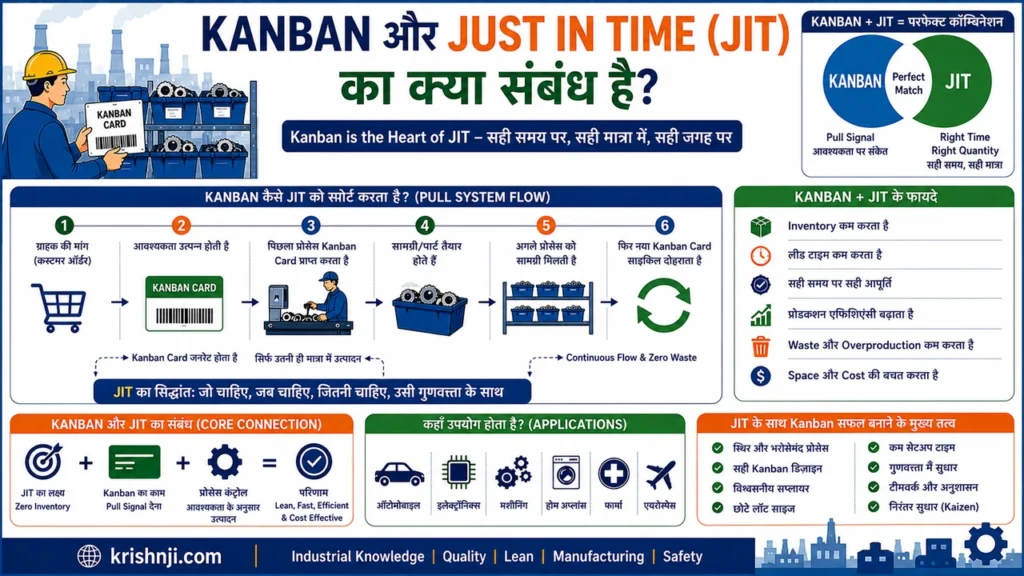
सरल शब्दों में
JIT बताता है कि क्या हासिल करना है:
सही चीज़ → सही मात्रा → सही समय → सही स्थान
Kanban बताता है कि Pull/Replenishment को operationally कैसे trigger करना है:
Consumption → Kanban Signal → Pull → Replenishment
इसलिए दोनों को इस तरह समझ सकते हैं:
JIT = Production Philosophy / Approach
Kanban = Pull & Replenishment Mechanism
Kanban JIT को कैसे Support करता है?
मान लीजिए Assembly Line को किसी component के 20 pieces चाहिए।
1. Assembly में 20 pieces consume होते हैं
↓
2. Kanban Signal generate होता है
↓
3. Upstream process / Supermarket को सूचना मिलती है
↓
4. 20 pieces replenish किए जाते हैं
↓
5. Assembly को material उपलब्ध होता है
इस तरह production area में आवश्यकता से बहुत अधिक material पहले से भेजने की बजाय consumption के आधार पर replenishment किया जाता है।
JIT और Kanban में अंतर (तालिका)
| आधार | Just in Time (JIT) | Kanban |
|---|---|---|
| क्या है? | Production/Inventory Management Approach | Visual Pull System/Mechanism |
| मुख्य उद्देश्य | सही समय पर सही quantity उपलब्ध कराना | Pull और replenishment को signal करना |
| Focus | Flow, Inventory, Timing | Signal, Pull, WIP और Replenishment |
| मुख्य विचार | आवश्यकता के समय उपलब्धता | आवश्यकता का visual signal |
| उपयोग | पूरे production system में | Material/Work flow control में |
| Example | Excess inventory न रखना | Empty container पर replenishment signal |
Kanban, JIT और Pull System का संबंध क्या है?
इन तीनों को एक साथ समझना सबसे आसान है:
Customer Demand
↓
JIT Requirement
↓
Pull System
↓
Kanban Signal
↓
Material / Production Replenishment
↓
Customer Demand के अनुसार Flow
अर्थात Kanban, JIT के Pull-based operation को support करने वाला एक महत्वपूर्ण mechanism है।
Manufacturing Example
मान लीजिए Battery Assembly Line में एक component के लिए:
Kanban Container = 20 pieces
जब 20 pieces consume हो जाते हैं:
Empty Container → Kanban Signal → Material Supermarket → 20 Pieces Replenish
इससे:
- जरूरत से ज्यादा line-side inventory रखने से बचा जा सकता है।
- Material replenishment standardized होता है।
- Production demand के साथ material flow synchronize हो सकता है।
- WIP और excess inventory को नियंत्रित करने में मदद मिलती है।
लेकिन यहाँ एक महत्वपूर्ण बात है: Kanban अकेले JIT की पूरी guarantee नहीं देता। JIT को प्रभावी बनाने के लिए stable processes, reliable suppliers, appropriate inventory parameters, quality और predictable flow भी आवश्यक हैं।
Kanban और JIT को एक लाइन में समझें
JIT एक व्यापक Lean production approach है जिसका लक्ष्य आवश्यकता के अनुसार material और production उपलब्ध कराना है, जबकि Kanban एक Pull-based visual mechanism है जो उस आवश्यकता के आधार पर production और replenishment को signal करता है।
यही कारण है कि Kanban और JIT एक-दूसरे के पर्याय नहीं हैं, बल्कि Kanban, JIT को operational रूप से support करने वाली महत्वपूर्ण प्रणाली है।
Kanban और Lean Manufacturing का क्या संबंध है?
Kanban, Lean Manufacturing में Work और Material Flow को demand के अनुसार नियंत्रित करने वाली एक महत्वपूर्ण Pull-based method है। Lean Manufacturing का मुख्य उद्देश्य customer value बढ़ाते हुए waste को कम करना और continuous flow बनाना है, जबकि Kanban visual signals, WIP limits और Pull System के माध्यम से excess production, unnecessary inventory और workflow bottlenecks को नियंत्रित करने में मदद करता है।
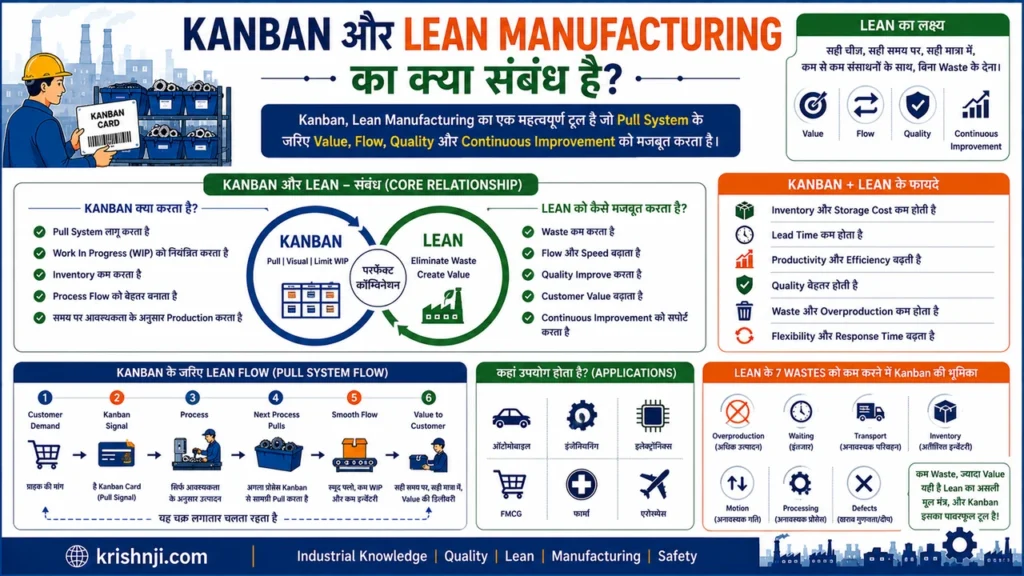
Lean Manufacturing में Kanban की भूमिका
Lean Manufacturing का मूल विचार है:
कम waste के साथ customer को अधिक value देना।
इसके लिए Lean में कई concepts और tools उपयोग किए जाते हैं, जैसे:
- Just in Time (JIT)
- Kanban
- Jidoka
- Kaizen
- 5S
- Standardized Work
- Heijunka
- Poka Yoke
- Visual Management
इनमें Kanban मुख्य रूप से Pull और Flow Management से जुड़ा है।
Kanban Lean Manufacturing के Objectives को कैसे Support करता है?
1. Pull System लागू करने में मदद करता है
Lean Manufacturing में unnecessary production से बचना महत्वपूर्ण है।
Kanban में downstream process की आवश्यकता upstream process को signal देती है।
Demand → Signal → Pull → Replenishment
इससे production को वास्तविक consumption के साथ align करने में मदद मिलती है।
2. Overproduction को नियंत्रित करता है
Lean में Overproduction को एक महत्वपूर्ण form of waste माना जाता है।
यदि upstream process अपनी सुविधा के अनुसार लगातार production करता रहे, तो excess inventory और WIP बढ़ सकते हैं।
Kanban signal production/replenishment को actual requirement से जोड़ने में मदद करता है।
3. Inventory और WIP को नियंत्रित करता है
Kanban में:
- Standard container quantity
- WIP Limit
- Replenishment rules
जैसे controls का उपयोग किया जा सकता है।
इससे material और semi-finished work को uncontrolled तरीके से जमा होने से रोकने में सहायता मिलती है।
4. Flow को Improve करता है
Lean Manufacturing में Continuous Flow महत्वपूर्ण objective है।
Kanban Board और signals से यह दिखाई दे सकता है कि:
- Work कहाँ रुका है?
- कहाँ queue बन रही है?
- किस process में bottleneck है?
- किस stage की capacity कम है?
इस visibility के आधार पर flow improvement किया जा सकता है।
5. Bottlenecks को Visual बनाता है
मान लीजिए:
Assembly → Testing → Inspection
अगर Testing process की capacity कम है, तो WIP Testing के सामने जमा होने लगेगा।
Kanban Board पर यह accumulation आसानी से दिखाई देगा।
फिर team root cause analysis करके bottleneck को improve कर सकती है।
Lean के साथ Kanban का संबंध क्या है? (तालिका)
| Lean Concept | Kanban से संबंध |
|---|---|
| JIT | Demand के अनुसार material/work उपलब्ध कराने में support |
| Pull System | Kanban का core operating mechanism |
| Visual Management | Work और material status को visual बनाता है |
| WIP Control | WIP Limits के माध्यम से control |
| Flow | Work को smoothly आगे बढ़ाने में मदद |
| Waste Reduction | Overproduction, waiting और excess inventory को नियंत्रित करने में सहायता |
| Kaizen | Flow problems identify करके continuous improvement |
| Heijunka | Production leveling के साथ Kanban flow को stabilize कर सकता है |
| Jidoka | Quality problems के कारण होने वाले abnormal flow को address करने में complementary भूमिका |
Kanban और Lean Manufacturing में अंतर (तालिका)
| Kanban | Lean Manufacturing |
|---|---|
| एक Pull/Flow Management method/system | व्यापक Management Philosophy/System |
| मुख्य focus Work/Material Flow पर | Value, Waste, Flow और Continuous Improvement पर |
| Kanban Card/Signal, Board, WIP Limit आदि उपयोग करता है | 5S, JIT, Kanban, Kaizen, Jidoka आदि कई approaches शामिल करता है |
| Pull को operationalize करता है | पूरे production system को improve करने का framework देता है |
| Lean का एक महत्वपूर्ण component/tool हो सकता है | Kanban से कहीं व्यापक concept |
आसान उदाहरण
इसे घर बनाने के उदाहरण से समझें:
Lean Manufacturing = पूरा construction approach
Kanban = उस approach के अंदर material/work flow control करने का एक महत्वपूर्ण तरीका
इसलिए यह कहना अधिक सही है:
“Kanban Lean Manufacturing का एक महत्वपूर्ण component है।”
यह कहना कम सही होगा:
“Kanban और Lean Manufacturing एक ही चीज़ हैं।”
Manufacturing Example
मान लीजिए किसी battery manufacturing line में Assembly को लगातार components चाहिए।
Lean approach के तहत factory का उद्देश्य होगा:
Right Material + Right Quantity + Right Time + Minimum Waste
Kanban इस objective को operationally support कर सकता है:
Component Consumption
↓
Kanban Signal
↓
Material Supermarket
↓
Fixed Quantity Replenishment
↓
Assembly Line
अगर किसी stage पर material लगातार जमा हो रहा है, तो Kanban Board/WIP data से समस्या दिखाई दे सकती है और Kaizen/RCA के माध्यम से सुधार किया जा सकता है।
Kanban + Lean + JIT का संबंध क्या है?
इन तीनों को एक साथ समझना सबसे महत्वपूर्ण है:
Lean Manufacturing
↓
Waste Reduction + Value + Flow + Continuous Improvement
↓
JIT / Pull Production
↓
Kanban
↓
Visual Signal + WIP Control + Replenishment
अर्थात:
Lean दिशा और व्यापक framework देता है, JIT demand के अनुसार production/material availability का approach देता है, और Kanban Pull एवं replenishment को operational रूप से support करता है।
एक लाइन में निष्कर्ष
Kanban, Lean Manufacturing का केवल एक visual board नहीं बल्कि Pull System, WIP Control, Material Replenishment और Flow Management को support करने वाला महत्वपूर्ण method है, जो Lean के waste reduction और continuous improvement objectives को practical manufacturing environment में लागू करने में मदद करता है।
Kanban और Heijunka का क्या संबंध है?
Kanban और Heijunka दोनों Lean Manufacturing और Toyota Production System के महत्वपूर्ण concepts हैं, लेकिन दोनों की भूमिकाएँ अलग हैं। Heijunka का उद्देश्य production को समय के साथ level और smooth करना है, जबकि Kanban demand के अनुसार Pull और replenishment signal देता है। दोनों साथ मिलकर production flow को अधिक stable, predictable और responsive बनाने में मदद करते हैं।
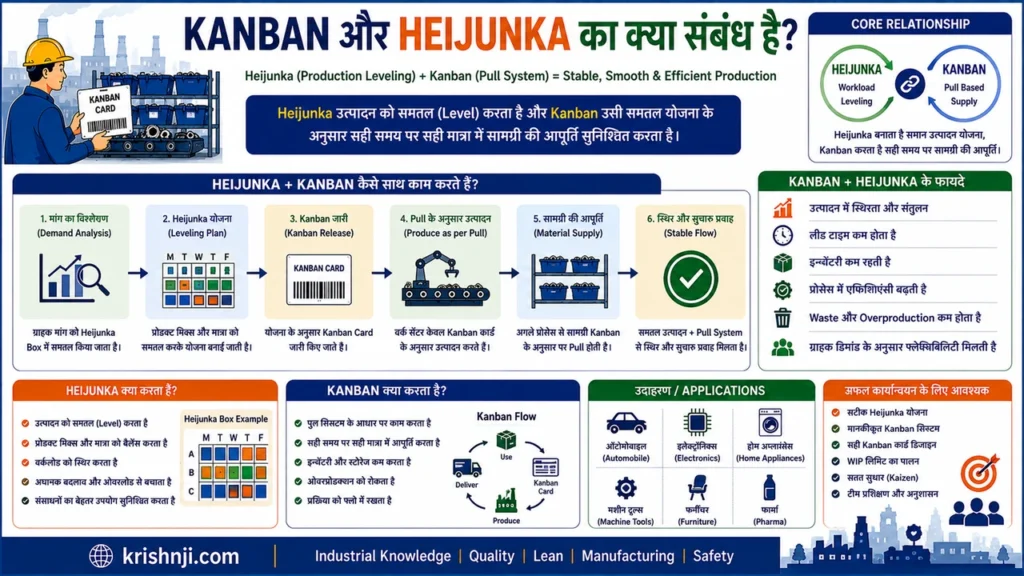
सरल भाषा में समझें
Heijunka तय करता है कि production को कैसे level करना है, जबकि Kanban signal देता है कि कब और कितनी quantity को replenish या produce करना है।
इसे ऐसे समझ सकते हैं:
Heijunka = Production Leveling
Kanban = Pull & Replenishment Signal
Heijunka और Kanban का Basic Flow
मान लीजिए किसी factory में तीन products बनते हैं:
Product A | Product B | Product C
Customer demand में उतार-चढ़ाव है।
Heijunka demand को level करके production sequence को smooth करने में मदद करता है:
A → B → A → C → A → B → A → C
इसके बाद Kanban signals actual consumption के आधार पर material और production replenishment को trigger करते हैं।
Heijunka → Level Production Plan
↓
Kanban → Pull/Replenishment Signal
↓
Production & Material Flow
Heijunka क्या करता है?
Heijunka का मुख्य उद्देश्य:
- Production volume को level करना
- Product mix को level करना
- Demand fluctuations का प्रभाव कम करना
- Production को अधिक predictable बनाना
- Unevenness (Mura) कम करना
- Overburden (Muri) और waste को नियंत्रित करने में मदद करना
उदाहरण:
अगर customer demand एक दिन में:
100 A + 100 B
है, तो पूरी quantity को batch में बनाने के बजाय production को छोटे, नियमित sequence में distribute किया जा सकता है।
यह भी पढ़ें…
3M Model in Hindi | Muda, Mura, Muri क्या है? अंतर, उदाहरण और उपयोग
Kanban क्या करता है?
Kanban मुख्य रूप से:
- Demand/consumption signal देता है
- Material pull करता है
- Replenishment trigger करता है
- WIP को control करता है
- Flow को visual बनाता है
उदाहरण:
20 Components Consume
↓
Kanban Signal
↓
20 Components Replenish
Kanban और Heijunka में अंतर (तालिका)
| आधार | Heijunka | Kanban |
|---|---|---|
| मुख्य अर्थ | Production Leveling | Visual Pull System |
| मुख्य उद्देश्य | Production को smooth करना | Work/Material को demand के अनुसार pull करना |
| Focus | Volume + Product Mix + Sequence | Signal + Replenishment + Flow |
| मुख्य समस्या | Uneven Production / Mura | Excess WIP, Overproduction, Flow Issues |
| मुख्य Tool | Heijunka Box / Leveling Plan | Kanban Card / Board |
| संबंध | Production को level करता है | Production/material flow को pull करता है |
Manufacturing में Practical Example
मान लीजिए battery factory में तीन battery models हैं:
- Model A
- Model B
- Model C
Customer demand के अनुसार weekly requirement है:
| Model | Demand |
|---|---|
| A | 50 |
| B | 30 |
| C | 20 |
अगर factory पहले 50 A, फिर 30 B और फिर 20 C बनाती है, तो production uneven हो सकता है।
Heijunka production को छोटे batches में level करने में मदद कर सकता है:
A → B → A → C → A → B → A → C…
अब production flow अधिक balanced हो सकता है।
इसके साथ Kanban material consumption/replenishment को signal करेगा।
उदाहरण:
Assembly में Component Consume
↓
Kanban Signal
↓
Material Supermarket
↓
Replenishment
↓
Assembly
इस तरह:
Heijunka = Production को level करता है
Kanban = Material/Work को pull और replenish करता है
Heijunka Box और Kanban का संबंध क्या है?
यह relationship आपके article में विशेष रूप से समझाना उपयोगी रहेगा।
Heijunka Box production schedule/sequence को visualise करने में मदद करता है।
Kanban Card material या production requirement का signal दे सकता है।
उदाहरण:
Heijunka Box
08:00 → A08:30 → B09:00 → A09:30 → C
और Kanban system यह सुनिश्चित करने में मदद करता है कि आवश्यक components/work demand के अनुसार replenish होते रहें।
दोनों साथ क्यों उपयोग किए जाते हैं?
अगर केवल Kanban हो और production demand बहुत uneven हो, तो upstream processes को अचानक बहुत ज्यादा या बहुत कम signals मिल सकते हैं।
अगर केवल Heijunka हो लेकिन material replenishment का effective Pull mechanism न हो, तो production leveling के बावजूद inventory और material flow में समस्या हो सकती है।
इसलिए दोनों complementary हैं:
Heijunka → Smooth Demand/Production Pattern
Kanban → Pull & Replenishment
दोनों → Stable Flow
एक लाइन में संबंध
Heijunka production volume और product mix को level करके flow को stable बनाता है, जबकि Kanban उस leveled production environment में demand-driven Pull, material replenishment और WIP control को support करता है।
इसलिए Lean Manufacturing में इन्हें एक sequence की तरह समझना उपयोगी है:
Demand → Heijunka (Leveling) → Kanban (Pull Signal) → Production/Replenishment → Stable Flow → Continuous Improvement
Kanban और Scrum में क्या अंतर है?
Kanban और Scrum दोनों work management और flow improvement के लिए उपयोग किए जाने वाले approaches हैं, लेकिन दोनों का operating model अलग है। Kanban मुख्य रूप से continuous flow, WIP limits और Pull System पर आधारित है, जबकि Scrum fixed-length Sprints, defined roles, events और Product Backlog के माध्यम से incremental delivery करता है। Kanban Manufacturing में भी व्यापक रूप से उपयोग होता है, जबकि Scrum मुख्यतः Agile software/product development में लोकप्रिय है।
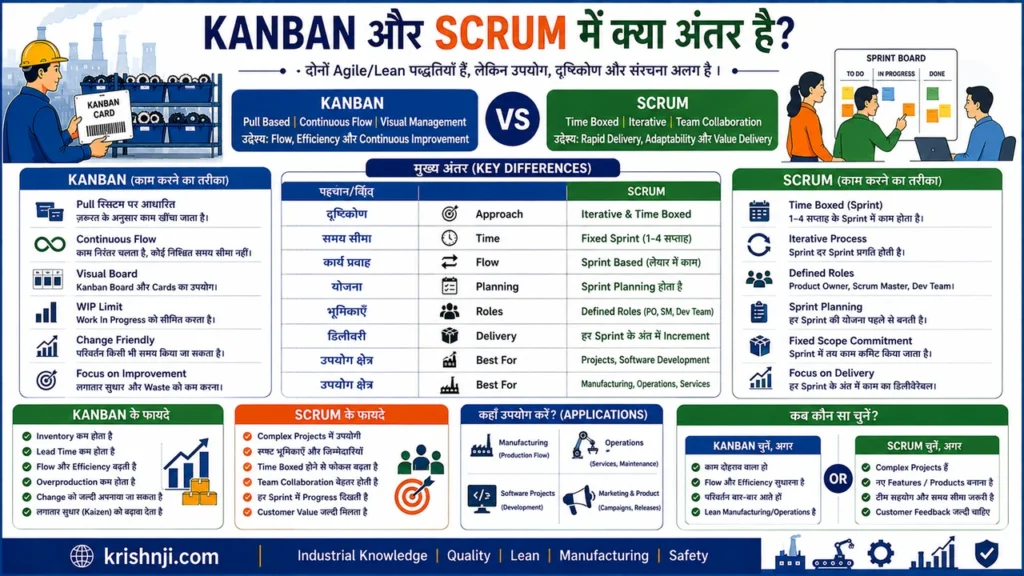
Kanban vs Scrum — एक नज़र में (तालिका)
| आधार | Kanban | Scrum |
|---|---|---|
| मुख्य उद्देश्य | Continuous Flow और WIP Control | Sprint-based Incremental Delivery |
| Work Model | Continuous | Iterative / Sprint-based |
| Time Box | जरूरी नहीं | सामान्यतः 1–4 सप्ताह का Sprint |
| WIP Limit | Core practice | Scrum में Kanban की तरह अनिवार्य core rule नहीं |
| Board | Kanban Board | Scrum Board |
| Work Pull | महत्वपूर्ण principle | Sprint Planning के बाद Sprint Backlog से work execute होता है |
| Roles | कोई prescribed mandatory role नहीं | Product Owner, Scrum Master, Developers |
| Change | Flow के दौरान work/priorities बदलना संभव | Sprint Goal के संदर्भ में Sprint के दौरान बदलाव सीमित/managed होते हैं |
| Metrics | Lead Time, Cycle Time, Throughput, WIP | Sprint Goal, Increment, Velocity आदि |
| मुख्य उपयोग | Manufacturing, Operations, Support, Software | Software/Product Development |
| Delivery | Continuous delivery/flow | Sprint के अंत में usable increment |
| Improvement | Continuous improvement | Retrospective आदि के माध्यम से नियमित improvement |
Kanban कैसे काम करता है?
Kanban में काम को visualize किया जाता है और WIP को सीमित करके continuous flow बनाया जाता है।
उदाहरण:
Backlog → To Do → In Progress → Testing → Done
यदि In Progress की WIP Limit = 3 है, तो वहाँ एक समय पर अधिकतम 3 items रहेंगे।
जब कोई item Done होता है:
Capacity Available → अगला Work Pull
इसका focus है:
Start less work → Finish work → Improve Flow
Scrum कैसे काम करता है?
Scrum में product backlog से work select करके एक निश्चित अवधि के Sprint में लिया जाता है।
Basic flow:
Product Backlog
↓
Sprint Planning
↓
Sprint Backlog
↓
Sprint
↓
Daily Scrum
↓
Increment
↓
Sprint Review + Retrospective
यहाँ team एक निश्चित Sprint Goal को achieve करने पर focus करती है।
सबसे बड़ा अंतर: Continuous Flow vs Sprint
Kanban
Work लगातार flow करता है:
Task Complete → Next Task Pull → Task Complete → Next Task Pull
Scrum
Work Sprint में organize होता है:
Planning → Sprint → Increment → Review → Retrospective → Next Sprint
इसलिए यदि आपका process continuous incoming work वाला है, Kanban अधिक natural fit हो सकता है।
अगर team को fixed iteration और Sprint Goal के साथ product development करना है, Scrum अधिक उपयुक्त हो सकता है।
Manufacturing में कौन बेहतर है?
यहाँ Kanban का advantage स्पष्ट है।
Manufacturing में:
Material Consumption → Kanban Signal → Replenishment → Production Flow
जैसी continuous process होती है।
Scrum का Sprint-based model traditional production material replenishment के लिए सामान्यतः primary method नहीं है।
हालाँकि Scrum को manufacturing में product development, engineering projects, automation projects या improvement projects में अपनाया जा सकता है।
क्या Kanban और Scrum को साथ इस्तेमाल किया जा सकता है?
हाँ।
Agile teams अक्सर Scrum के साथ Kanban practices जैसे:
- WIP Limits
- Cycle Time Tracking
- Cumulative Flow Diagram
- Visual Workflow
का उपयोग कर सकती हैं।
इसे अक्सर Scrumban जैसे hybrid approach के रूप में देखा जाता है।
सरल उदाहरण
मान लीजिए एक software team के पास लगातार customer support tickets आते हैं।
Kanban
New → In Progress → Testing → Done
WIP Limit:
In Progress = 3
जैसे ही एक ticket complete होता है, अगला ticket pull किया जाता है।
Scrum
Team कहती है:
“अगले 2 सप्ताह के Sprint में हम इन selected features पर काम करेंगे।”
फिर Sprint के दौरान team उस Sprint Goal को पूरा करने पर focus करती है।
Kanban vs Scrum — कब क्या चुनें?
| Situation | बेहतर विकल्प |
|---|---|
| Continuous production flow | Kanban |
| Material replenishment | Kanban |
| लगातार आने वाले support requests | Kanban |
| Fixed Sprint में product development | Scrum |
| स्पष्ट Sprint Goal चाहिए | Scrum |
| WIP control प्राथमिकता है | Kanban |
| Defined Agile roles/events चाहिए | Scrum |
| दोनों approaches की practices चाहिए | Scrumban/Hybrid |
सबसे महत्वपूर्ण बात
Kanban और Scrum competitors नहीं हैं। दोनों का उद्देश्य work को अधिक effective बनाना है, लेकिन उनका तरीका अलग है।
Kanban = Continuous Flow + Pull + WIP Limits
Scrum = Sprints + Roles + Events + Incremental Delivery
और आपके Manufacturing/Lean context में Kanban को Scrum से compare करते समय यह स्पष्ट करना जरूरी है कि Kanban का उपयोग केवल software task management तक सीमित नहीं है; इसका मूल manufacturing context material flow, production control और Pull System से गहराई से जुड़ा है।
Kanban और Andon का संबंध क्या है?
Kanban और Andon दोनों Lean Manufacturing में Visual Management को support करते हैं, लेकिन उनका उद्देश्य अलग है। Kanban मुख्य रूप से Material, Production और Work को Pull करने का signal देता है, जबकि Andon Process Abnormality, Quality Problem, Machine Issue या सहायता की आवश्यकता को तुरंत visual signal के रूप में दिखाता है। दोनों साथ मिलकर smooth flow और fast problem response को support करते हैं।
सरल भाषा में
Kanban बताता है — “क्या और कब replenish/produce करना है?”
Andon बताता है — “Process में समस्या कहाँ है और किसे सहायता चाहिए?”
Kanban और Andon की तुलना
| आधार | Kanban | Andon |
|---|---|---|
| मुख्य उद्देश्य | Pull और Replenishment | Abnormality और Problem Signal |
| मुख्य Focus | Material / Production Flow | Quality / Machine / Process Problem |
| Signal | Kanban Card, Container, Digital Signal | Light, Display, Alarm, Buzzer |
| मुख्य सवाल | क्या replenish करना है? | कहाँ समस्या है? |
| Lean Principle | Pull System | Visual Management + Jidoka |
| Example | 20 components replenish करें | Machine/Process में problem |
| Response | Material/Production action | Supervisor/Maintenance/Quality response |
Manufacturing में दोनों साथ कैसे काम करते हैं?
मान लीजिए Battery Assembly Line पर connector का एक Kanban container खाली हो गया।
Material Consumption
↓
Kanban Signal
↓
20 Connectors Replenish
यहाँ Kanban material flow को control कर रहा है।
अब उसी assembly station पर machine में abnormality आ जाती है:
Machine Abnormality
↓
Andon Signal
↓
Operator/Supervisor Alert
↓
Problem Identification & Corrective Action
इस तरह:
Kanban → Material Flow
Andon → Problem Flow
Practical Factory Example
मान लीजिए किसी battery manufacturing line पर दो situations हैं:
Situation 1 — Material कम है
Assembly station पर connectors निर्धारित minimum level तक पहुँच गए।
→ Kanban Signal
→ Material Handler को notification
→ Replenishment
Situation 2 — Machine में abnormality है
Assembly machine में sensor fault आ गया।
→ Andon Signal
→ Operator/Technician को alert
→ Machine inspection
→ Problem resolution
दोनों signals अलग-अलग problems को address करते हैं, लेकिन दोनों का उद्देश्य production system को visible और responsive बनाना है।
Kanban + Andon + Jidoka का संबंध
इन्हें Lean Manufacturing में एक साथ समझना काफी useful है:
Kanban
→ Pull & Material Flow
Andon
→ Abnormality Visibility
Jidoka
→ Problem होने पर process को रोकना/समस्या को source पर address करना
उदाहरण:
Material Consumption → Kanban → Replenishment
और दूसरी तरफ:
Quality/Machine Abnormality → Andon → Response → Jidoka-based Problem Solving
इससे factory में एक तरफ smooth material flow और दूसरी तरफ quality/problem visibility maintain करने में मदद मिलती है।
एक लाइन में संबंध
Kanban production और material को demand के अनुसार Pull करने में मदद करता है, जबकि Andon production process में abnormality को तुरंत visualize और escalate करता है; दोनों मिलकर Lean Manufacturing में flow, visibility और rapid problem response को support करते हैं।
यह भी पढ़ें….
Andon System क्या है? | प्रकार, काम करने का तरीका, उदाहरण और फायदे
Kanban के लाभ क्या हैं?
Kanban का मुख्य लाभ यह है कि यह work और material flow को visual बनाकर, WIP को नियंत्रित करके और demand के आधार पर Pull System चलाकर production और workflow को अधिक व्यवस्थित बनाने में मदद करता है। Manufacturing में Kanban excess inventory, overproduction, material shortage और bottlenecks को नियंत्रित करने में सहायता कर सकता है, जबकि teams को continuous improvement के लिए स्पष्ट process visibility देता है।
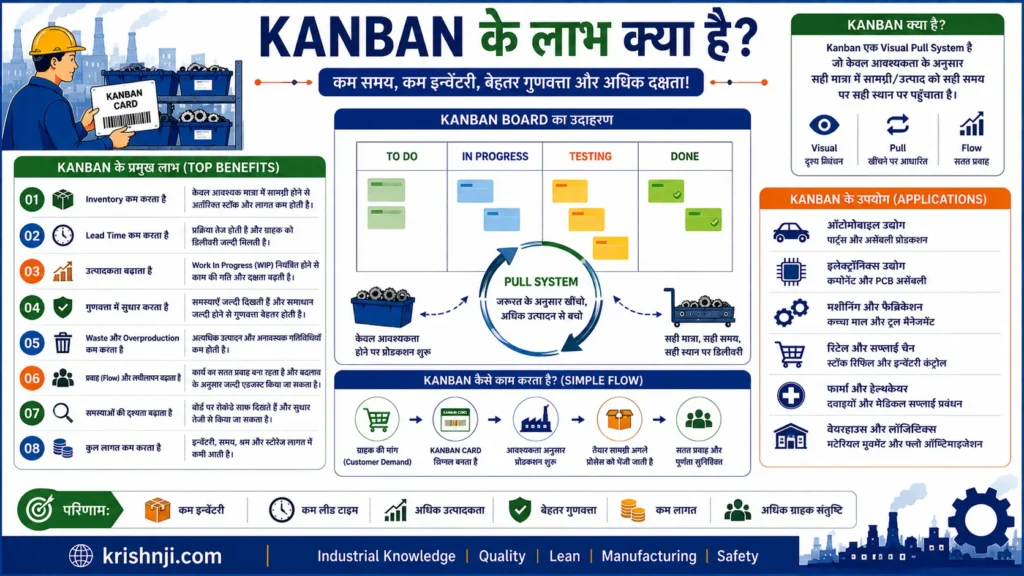
1. Overproduction को नियंत्रित करने में मदद
Kanban में production को downstream demand या consumption से जोड़ने का प्रयास किया जाता है।
Demand → Kanban Signal → Production/Replenishment
इससे केवल अनुमान के आधार पर unnecessary production करने का risk कम हो सकता है।
2. Inventory को नियंत्रित करता है
Kanban में standard container quantity, replenishment rules और Pull System का उपयोग करके inventory को controlled level पर रखने में मदद मिलती है।
इससे:
- Excess stock कम हो सकता है
- Storage requirement कम हो सकती है
- Inventory carrying cost नियंत्रित हो सकती है
3. WIP कम करने में मदद
WIP Limit यह निर्धारित करती है कि एक process में एक समय पर कितना work मौजूद हो सकता है।
इससे excessive work-in-progress और process congestion को नियंत्रित करने में सहायता मिलती है।
4. Material Flow बेहतर करता है
Kanban material को आवश्यकता के अनुसार एक process से दूसरे process तक flow कराने में मदद करता है।
उदाहरण:
Material Supermarket → Assembly → Testing
अगर Assembly material consume करती है, तो Kanban signal replenishment को trigger कर सकता है।
5. Bottlenecks जल्दी दिखाई देते हैं
Kanban Board पर यदि किसी process stage में लगातार cards या WIP जमा हो रहा है, तो bottleneck आसानी से identify किया जा सकता है।
उदाहरण:
Assembly → Testing → Inspection
यदि Testing के सामने लगातार WIP जमा हो रहा है, तो Testing capacity या process में समस्या investigate की जा सकती है।
6. Lead Time कम करने में सहायता
WIP और waiting को नियंत्रित करने से work को system के अंदर कम समय तक रोकने में मदद मिल सकती है।
इससे:
Waiting ↓ → Queue ↓ → Lead Time ↓
हो सकता है।
हालाँकि केवल Kanban लागू करने से Lead Time अपने आप कम नहीं होता; process improvement भी आवश्यक है।
यह भी पढ़ें….
Takt Time vs Lead Time vs Cycle Time vs Throughput Time in Hindi: अंतर, Formula, उदाहरण और सही उपयोग
7. Process Visibility बढ़ाता है
Kanban Board पर team एक नज़र में देख सकती है:
- कौन-सा काम pending है?
- कौन-सा work in progress है?
- क्या testing में है?
- कहाँ blockage है?
- क्या complete हो चुका है?
इससे decision-making अधिक visual और transparent हो सकती है।
8. Material Shortage को नियंत्रित करने में मदद
Kanban signal यह बताता है कि standard quantity में material replenish करने की आवश्यकता है।
इससे material shortage को जल्दी identify करने और replenishment process को standardized बनाने में मदद मिलती है।
9. Productivity और Focus सुधार सकता है
WIP Limit के कारण team एक साथ बहुत सारे काम शुरू करने के बजाय existing work को complete करने पर focus करती है।
इसका principle है:
Stop Starting, Start Finishing.
10. Continuous Improvement को Support करता है
Kanban system problems को visible बनाता है।
Team data और workflow देखकर पूछ सकती है:
“Work कहाँ रुक रहा है और क्यों?”
इसके बाद:
- Root Cause Analysis
- Kaizen
- Process Improvement
- Capacity Balancing
जैसे methods का उपयोग किया जा सकता है।
Manufacturing में Kanban के लाभ — एक नज़र में (तालिका)
| लाभ | प्रभाव |
|---|---|
| Overproduction Control | अनावश्यक production कम करने में मदद |
| Inventory Control | Excess stock नियंत्रित |
| WIP Control | Process congestion कम |
| Better Flow | Material/work movement बेहतर |
| Bottleneck Visibility | Process constraints जल्दी दिखाई देते हैं |
| Lead Time Improvement | Waiting और queue कम करने में सहायता |
| Material Availability | Replenishment अधिक systematic |
| Visual Management | Process status स्पष्ट |
| Standardization | Replenishment rules स्पष्ट |
| Continuous Improvement | Problems identify और improve करना आसान |
Kanban का सबसे बड़ा लाभ क्या है?
Kanban का सबसे महत्वपूर्ण लाभ केवल inventory कम करना नहीं है।
इसकी वास्तविक ताकत है:
“Work और material flow में problems को visible बनाना और demand के अनुसार controlled Pull System बनाना।”
जब Kanban को WIP Limits + Standardized Work + Reliable Processes + JIT + Continuous Improvement के साथ सही तरीके से लागू किया जाता है, तो यह manufacturing system को अधिक stable, responsive और waste-conscious बनाने में महत्वपूर्ण भूमिका निभा सकता है।
Kanban की Limitations और Challenges क्या हैं?
Kanban एक प्रभावी Pull और Flow Management system है, लेकिन यह हर manufacturing environment में समान रूप से प्रभावी नहीं होता। इसकी सफलता के लिए relatively stable processes, reliable replenishment, accurate demand information, disciplined execution और सही Kanban parameters आवश्यक होते हैं। गलत WIP limits, unreliable suppliers, fluctuating demand या poor process discipline के कारण Kanban में stockout, delays और production disruption जैसी समस्याएँ हो सकती हैं।
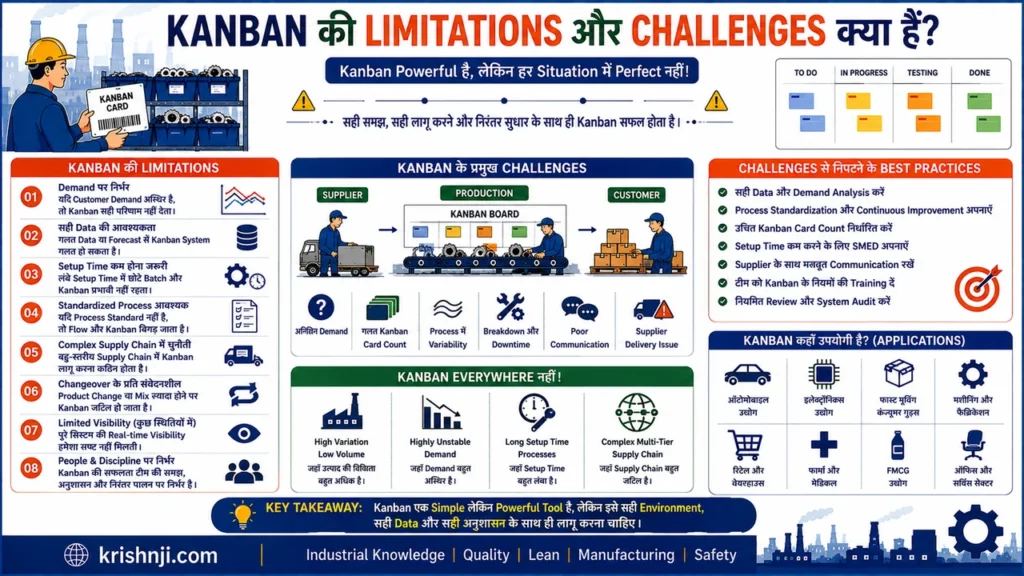
1. Demand में बहुत अधिक उतार-चढ़ाव
Kanban actual consumption पर आधारित होने के कारण highly unpredictable demand में challenge पैदा कर सकता है।
यदि demand अचानक बहुत बढ़ जाए:
Demand ↑ → Consumption ↑ → Kanban Signals ↑ → Replenishment Pressure ↑
अगर upstream capacity पर्याप्त नहीं है, तो material shortage हो सकता है।
समाधान: Demand analysis, safety stock और appropriate Kanban quantity का उपयोग।
2. Supplier Reliability पर निर्भरता
Supplier से material समय पर नहीं आया तो Kanban का पूरा replenishment cycle प्रभावित हो सकता है।
उदाहरण:
Supplier Delay → Material Shortage → Production Waiting → Line Downtime
इसलिए Kanban के लिए reliable supplier और stable delivery performance महत्वपूर्ण हैं।
3. गलत Kanban Quantity से समस्या
अगर Kanban container quantity बहुत कम है:
Replenishment Frequency ↑ → Material Handling ↑
अगर quantity बहुत ज्यादा है:
Inventory ↑ → Space Requirement ↑
इसलिए Kanban quantity को demand, lead time, container size और process capability के आधार पर निर्धारित करना चाहिए।
4. Process Instability
Kanban stable और predictable processes में बेहतर काम करता है।
यदि लगातार:
- Machine breakdown
- Quality defects
- Long changeover
- Unplanned downtime
- Process variation
हो रही है, तो Kanban flow बार-बार disrupt हो सकता है।
इसलिए पहले process stability improve करना आवश्यक हो सकता है।
5. WIP Limit गलत निर्धारित होना
बहुत कम WIP Limit:
Process को बार-बार material/work की कमी हो सकती है।
बहुत अधिक WIP Limit:
WIP और waiting बढ़ सकती है।
इसलिए WIP Limit को actual process data और capacity के आधार पर continuously review करना चाहिए।
6. Implementation Discipline की आवश्यकता
Kanban केवल card या board लगाने से सफल नहीं होता।
Operators और supervisors को निर्धारित rules follow करने होते हैं:
- Kanban Card सही जगह रखना
- Standard quantity maintain करना
- Signal समय पर देना
- बिना signal production न करना
- WIP limits का पालन करना
- Containers की सही पहचान रखना
यदि discipline कमजोर है, तो system धीरे-धीरे ineffective हो सकता है।
7. Initial Implementation में Resistance
Employees को नए Pull System के कारण शुरुआत में कुछ difficulties हो सकती हैं।
उदाहरण:
“पहले हम extra material रखते थे, अब limited quantity क्यों?”
इसलिए:
- Training
- Communication
- Pilot implementation
- Visual standards
महत्वपूर्ण हैं।
8. Emergency Situations के लिए अतिरिक्त व्यवस्था चाहिए
Machine breakdown, supplier failure या sudden customer demand जैसी situations में normal Kanban quantity पर्याप्त नहीं हो सकती।
इसलिए emergency replenishment rules और escalation process पहले से define करना उपयोगी है।
9. Long Lead Time वाले Suppliers में चुनौती
अगर supplier lead time बहुत लंबा है, तो केवल छोटा Kanban inventory level रखना practical नहीं हो सकता।
उदाहरण:
Supplier Lead Time = 15 Days
लेकिन material consumption लगातार हो रहा है।
ऐसी स्थिति में lead time, demand variation और risk के अनुसार Kanban quantity तथा buffer को design करना होगा।
10. बहुत अधिक Product Variety
यदि factory में बहुत सारे product variants और components हैं, तो प्रत्येक item के लिए Kanban cards, quantities और replenishment rules manage करना complex हो सकता है।
इससे:
- Kanban cards की संख्या बढ़ सकती है
- Inventory parameters manage करना कठिन हो सकता है
- Material identification errors का risk बढ़ सकता है
ऐसे environment में e-Kanban, ERP/MES integration और barcode/QR tracking उपयोगी हो सकते हैं।
11. Technology और Data Accuracy की चुनौती
Digital Kanban में गलत data भी समस्या पैदा कर सकता है।
उदाहरण:
Wrong Scan → Wrong Inventory Data → Wrong Kanban Signal → Wrong Replenishment
इसलिए barcode/QR/RFID और ERP/MES integration में data accuracy महत्वपूर्ण है।
12. Kanban को “Zero Inventory” समझने की गलती
यह एक common misconception है।
Kanban का उद्देश्य inventory को हमेशा zero करना नहीं है।
इसका उद्देश्य है:
आवश्यकता के अनुरूप controlled inventory और smooth flow बनाना।
कुछ परिस्थितियों में safety stock या buffer inventory आवश्यक हो सकती है।
Kanban Limitations — एक नज़र में (तालिका)
| Challenge | संभावित प्रभाव |
|---|---|
| Demand Fluctuation | Stockout / Replenishment Pressure |
| Supplier Delay | Material Shortage |
| Wrong Kanban Quantity | Excess Inventory या Shortage |
| Machine Breakdown | Flow Disruption |
| Poor Quality | Rework और Material Delay |
| Wrong WIP Limit | Congestion या Starvation |
| Poor Discipline | Kanban Signals unreliable |
| High Product Variety | System Complexity |
| Long Lead Time | अधिक Buffer की आवश्यकता |
| Poor Data Accuracy | Wrong Replenishment |
| Employee Resistance | Implementation Slowdown |
Kanban की Limitations को कैसे कम करें?
एक practical manufacturing implementation में इन factors पर ध्यान दें:
Stable Process
↓
Reliable Suppliers
↓
Accurate Demand Data
↓
Correct Kanban Quantity
↓
Appropriate WIP Limits
↓
Standardized Work
↓
Visual Management
↓
Regular KPI Review
↓
Continuous Improvement
महत्वपूर्ण KPIs
Kanban की effectiveness monitor करने के लिए:
- WIP
- Lead Time
- Cycle Time
- Throughput
- Stockout Frequency
- Supplier On-Time Delivery
- Inventory Turnover
- Kanban Card Accuracy
- Line Stoppage Due to Material Shortage
को track किया जा सकता है।
निष्कर्ष
Kanban की सबसे बड़ी limitation यह नहीं है कि system कमजोर है, बल्कि यह है कि Kanban एक unstable और unreliable production environment की समस्याओं को छिपाने के बजाय अक्सर उन्हें और अधिक visible बना देता है। इसलिए Kanban लागू करने से पहले process stability, supplier reliability, quality, standard work और सही replenishment parameters पर काम करना महत्वपूर्ण है।
यही Kanban की असली ताकत भी है—समस्या को छिपाने के बजाय flow में दिखाई देना।
Factory में Kanban System कैसे Implement करें?
Factory में Kanban System implement करने के लिए पहले material और production flow को समझकर demand, replenishment quantity, WIP limit और Kanban signals निर्धारित किए जाते हैं। इसके बाद pilot area में Kanban Card/Container/Board लागू करके Pull System शुरू किया जाता है। Performance को WIP, Lead Time, Stockout और Inventory जैसे KPIs से monitor करके system को लगातार improve किया जाता है।
Factory में Kanban Implementation का Step-by-Step Process
Demand → Process Mapping → Product Selection → Standard Quantity → Kanban Calculation → Supermarket → Kanban Signal → Pull Flow → Pilot → KPI Monitoring → Continuous Improvement
1. सबसे पहले Current Process को समझें
पूरी factory में एक साथ Kanban लागू करने के बजाय पहले material और information flow को map करें।
उदाहरण:
Supplier → Raw Material Store → Production → Assembly → Testing → Finished Goods
Identify करें:
- Material कहाँ से आता है?
- कहाँ store होता है?
- कहाँ consume होता है?
- कहाँ WIP जमा होता है?
- कहाँ bottleneck है?
- Material shortage कहाँ होती है?
2. Pilot Area चुनें
शुरुआत किसी एक suitable product, component या production line से करें।
अच्छा pilot area सामान्यतः ऐसा होना चाहिए जहाँ:
- Demand relatively predictable हो
- Material consumption नियमित हो
- Process stable हो
- Replenishment frequency स्पष्ट हो
- Current material-flow problem दिखाई देती हो
पूरी factory में तुरंत Kanban लगाने से बचें।
3. Kanban Item और Standard Quantity तय करें
हर component के लिए तय करें:
- Part Number
- Part Name
- Container Size
- Quantity per Container
- Source Location
- Destination Location
- Replenishment Frequency
उदाहरण:
Battery Connector
1 Container = 20 Pieces
इससे operator और material handler दोनों को स्पष्ट रहेगा कि एक Kanban signal पर कितनी quantity move करनी है।
4. Supermarket और Replenishment Point बनाएं
Production line के पास controlled material location बनाएं।
उदाहरण:
Material Supermarket → Assembly Line
Supermarket में निर्धारित quantity का material रखा जाता है। जैसे ही downstream process material consume करती है, Kanban signal upstream replenishment को trigger करता है।
5. Kanban Signal का तरीका चुनें
Factory की जरूरत के अनुसार:
- Kanban Card
- Empty Container
- Two-Bin System
- Barcode
- QR Code
- RFID
- e-Kanban
में से suitable method चुनें।
शुरुआत में simple physical Kanban card/container अक्सर पर्याप्त हो सकता है; बाद में digital system से integrate किया जा सकता है।
6. Kanban Card Design करें
एक practical Kanban card में ये information रखी जा सकती है:
| Field | Example |
|---|---|
| Kanban ID | KB-025 |
| Part No. | BC-1025 |
| Part Name | Battery Connector |
| Quantity | 20 |
| From | Supermarket |
| To | Assembly Line-01 |
| Container | Bin-05 |
| Signal Type | Withdrawal |
| Barcode/QR | Yes |
Card ऐसी होनी चाहिए जिसे operator/material handler एक नज़र में समझ सके।
7. WIP Limit निर्धारित करें
हर process के लिए practical WIP limit निर्धारित करें।
उदाहरण:
| Process | WIP Limit |
|---|---|
| Assembly | 5 |
| Testing | 3 |
| Inspection | 2 |
अगर Testing में पहले से 3 units हैं, तो Assembly से लगातार नई units push करने के बजाय Testing capacity/bottleneck को investigate किया जाए।
8. Pull Rules स्पष्ट करें
यह सबसे महत्वपूर्ण implementation step है।
सभी operators को स्पष्ट rules दें:
“Kanban signal के बिना production/replenishment नहीं।”
और:
“जितनी standard quantity निर्धारित है, उतनी ही replenish करें।”
इससे system में uncontrolled production और excess material movement कम करने में मदद मिलती है।
9. Two-Bin Kanban का उपयोग करें
छोटे और frequently consumed components के लिए Two-Bin System बहुत practical हो सकता है।
Bin 1 → Current Use
Bin 2 → Backup
Bin 1 खाली होने पर:
Empty Bin → Kanban Signal → Replenishment → Full Bin
इस दौरान दूसरा bin production को material उपलब्ध कराता रहता है।
10. Pilot Run करें
पहले छोटे area में Kanban को कुछ समय operate करके देखें।
Monitor करें:
- Material shortage
- Excess material
- Kanban errors
- Waiting
- WIP
- Replenishment time
- Operator feedback
अगर problems मिलें तो Kanban quantity और rules adjust करें।
11. KPIs से Performance Measure करें
Kanban implementation के बाद केवल यह न देखें कि cards सही जगह लग रहे हैं या नहीं।
Actual performance measure करें:
| KPI | उद्देश्य |
|---|---|
| WIP | Process में कितना work है |
| Lead Time | Order/work completion में कितना समय |
| Cycle Time | Process time |
| Stockout Frequency | Material shortage कितनी बार हुई |
| Inventory Level | कितना inventory रखा जा रहा है |
| Throughput | कितनी units complete हुईं |
| Kanban Accuracy | Signals और actual requirement का match |
| Line Stoppage | Material shortage से कितना downtime |
12. Kanban Quantity को Data के आधार पर Adjust करें
मान लीजिए शुरुआत में:
Container = 20 pieces
लेकिन data से पता चला कि supplier lead time और consumption variation के कारण बार-बार shortage हो रही है।
तो केवल “Kanban fail हो गया” मानने के बजाय investigate करें:
- Demand variation?
- Supplier delay?
- Internal replenishment delay?
- Container quantity गलत?
- Process instability?
फिर parameters को data के आधार पर revise करें।
Practical Example: Battery Manufacturing
मान लीजिए battery assembly line में Connector की consumption:
10 pieces/hour
और replenishment lead time:
1 hour
अगर एक container में:
20 pieces
हैं, तो एक container लगभग 2 घंटे की consumption cover करता है।
अब factory को केवल consumption ही नहीं बल्कि demand variation, replenishment reliability और required buffer को भी ध्यान में रखकर Kanban quantity और number of containers तय करना चाहिए।
Flow:
Connector Consumption
↓
Container Empty
↓
Kanban Signal
↓
Material Supermarket
↓
20 Connectors Replenish
↓
Assembly Line
इससे material handler को manually अंदाजा लगाने की बजाय standardized replenishment signal मिलता है।
Factory में Kanban Implement करते समय 5 Golden Rules
1. पहले process stabilize करें।
Machine breakdown और quality problems बहुत ज्यादा हों तो Kanban से पहले basic stability improve करें।
2. Standard quantity तय करें।
हर Kanban signal पर कितनी quantity move/produce होगी, स्पष्ट होना चाहिए।
3. WIP Limit का पालन करें।
Limit केवल board पर लिखने के लिए नहीं है।
4. Kanban को Push System में न बदलें।
Signal के बिना unnecessary production न करें।
5. Data के आधार पर continuously improve करें।
Kanban quantity, WIP limits और replenishment frequency को समय-समय पर review करें।
Factory Kanban Implementation का पूरा Model
Customer Demand
↓
Heijunka / Demand Leveling
↓
Production & Material Flow Mapping
↓
Supermarket / Point of Use
↓
Kanban Card / Container / e-Kanban
↓
Pull Signal
↓
Replenishment
↓
WIP & Flow Control
↓
KPI Monitoring
↓
Kaizen / Continuous Improvement
एक महत्वपूर्ण बात
Kanban लागू करने का लक्ष्य inventory को अचानक “zero” करना नहीं है। सही लक्ष्य है controlled inventory के साथ reliable Pull Flow बनाना। इसलिए पहले छोटा pilot शुरू करना, standard work बनाना, operators को train करना और data के आधार पर Kanban quantity/WIP limits adjust करना अधिक practical approach है।
और यदि factory में Industry 4.0 infrastructure मौजूद है, तो यही system आगे Barcode/QR → PLC/MES/ERP → e-Kanban → Digital Dashboard तक विकसित किया जा सकता है।
Kanban Performance को Measure करने के लिए कौन-कौन से KPIs महत्वपूर्ण हैं?
Kanban Performance को केवल inventory कम होने से measure नहीं करना चाहिए। एक effective Kanban system में Flow, WIP, Lead Time, Throughput, Inventory, Replenishment और Material Availability को एक साथ monitor किया जाता है। Manufacturing में ये KPIs यह पता लगाने में मदद करते हैं कि Kanban वास्तव में production flow सुधार रहा है या केवल cards और containers का उपयोग हो रहा है।
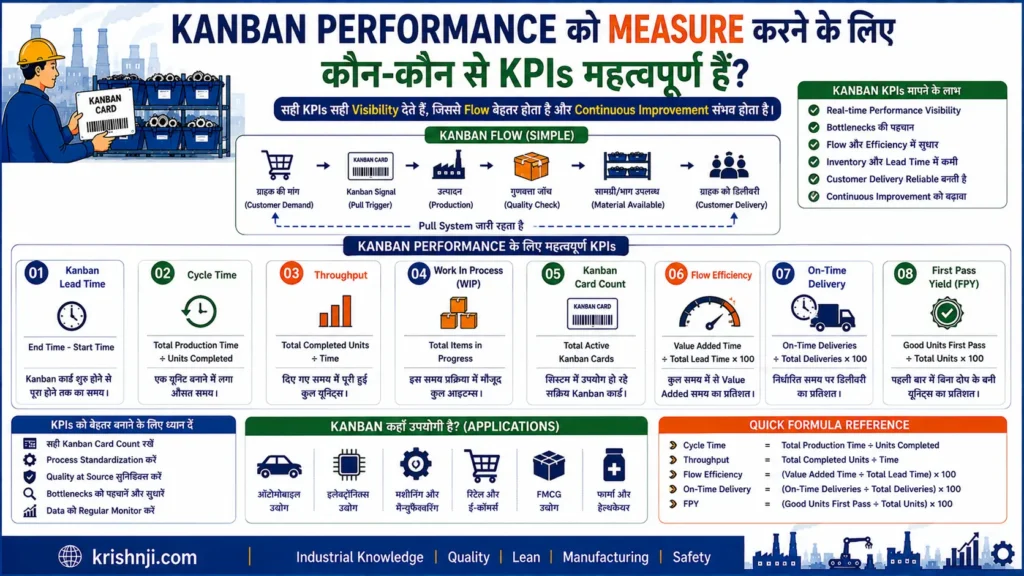
Kanban के महत्वपूर्ण KPIs — एक नज़र में (तालिका)
| KPI | क्या Measure करता है? | Kanban में महत्व |
|---|---|---|
| WIP | Process में मौजूद work | WIP control |
| Lead Time | Request से completion तक समय | Flow speed |
| Cycle Time | Work/process पूरा करने का समय | Process efficiency |
| Throughput | निश्चित समय में completed units | Output |
| Queue Time | Work ने कितना wait किया | Bottleneck |
| Inventory Level | उपलब्ध stock | Inventory control |
| Stockout Rate | Material shortage की frequency | Material availability |
| Replenishment Lead Time | Signal से material availability तक समय | Pull responsiveness |
| Kanban Accuracy | Signal और actual requirement का match | System reliability |
| On-Time Delivery | Required time पर delivery | Customer/service performance |
| Line Stoppage | Material shortage से production loss | Kanban effectiveness |
1. WIP — Work in Progress
WIP Kanban का सबसे महत्वपूर्ण operational KPIs में से एक है।
यह बताता है कि system में एक समय पर कितना work या semi-finished material मौजूद है।
उदाहरण:
Assembly WIP = 15 units
अगर WIP लगातार बढ़ रहा है, तो यह bottleneck या excessive work release का संकेत हो सकता है।
Target: WIP को निर्धारित limits के भीतर नियंत्रित रखना।
2. Lead Time
Lead Time यह बताता है कि work/request के शुरू होने से completion तक कितना समय लगा।
सरल रूप:
Lead Time = Completion Time − Request/Start Time
उदाहरण:
Material request: 10:00 AM
Material available: 11:30 AM
Lead Time = 1.5 hours
Kanban का उद्देश्य flow improve करके unnecessary waiting और queue को कम करने में मदद करना है।
3. Cycle Time
Cycle Time किसी process को एक unit/work item पूरा करने में लगने वाला समय है।
उदाहरण:
एक battery testing process में:
Start → Testing Complete = 8 minutes
तो cycle time = 8 minutes/unit
Cycle Time और Lead Time को अलग रखना महत्वपूर्ण है।
Cycle Time = Processing Time
Lead Time = Overall elapsed time
4. Throughput
Throughput time बताता है कि निश्चित समय में कितनी units/work items complete हुए।
उदाहरण:
8 hours में 400 units completed
तो:
Throughput = 50 units/hour
Kanban में Throughput को WIP और Lead Time के साथ देखना अधिक meaningful होता है।
5. Queue Time
Queue Time वह समय है जब work process होने की बजाय waiting करता है।
उदाहरण:
Work arrived → 30 min waiting → Processing started
Queue Time = 30 minutes
अगर Queue Time लगातार बढ़ रहा है, तो process capacity या workflow में bottleneck हो सकता है।
6. Inventory Level
Kanban का उद्देश्य inventory को uncontrolled तरीके से बढ़ने से रोकना है।
Monitor करें:
- Raw Material Inventory
- WIP Inventory
- Finished Goods Inventory
- Line-side Inventory
लेकिन केवल inventory कम करना लक्ष्य नहीं होना चाहिए। Material availability और production continuity भी maintain करनी होती है।
7. Stockout Rate
यह बताता है कि production को material shortage कितनी बार हुई।
उदाहरण:
एक महीने में:
10 material shortage events
तो Stockout Frequency = 10 events/month
यदि Kanban लागू करने के बाद inventory कम हुई लेकिन stockouts बहुत बढ़ गए, तो Kanban parameters सही नहीं हैं।
8. Replenishment Lead Time
यह Kanban signal generate होने से लेकर material के वापस available होने तक का समय है।
Kanban Signal → Material Available
उदाहरण:
Signal: 10:00 AM
Replenishment: 10:45 AM
Replenishment Lead Time = 45 minutes
इस KPI को कम और stable रखना Pull System के लिए महत्वपूर्ण है।
9. Kanban Accuracy
यह check करता है कि Kanban signal में दी गई information और actual requirement कितनी accurate है।
जैसे:
- सही Part Number?
- सही Quantity?
- सही Destination?
- सही Kanban ID?
- सही container?
Digital/e-Kanban systems में barcode/QR/RFID data accuracy भी महत्वपूर्ण हो सकती है।
10. On-Time Delivery
Kanban internal processes के बीच material delivery को भी support करता है।
Measure करें:
Required time पर कितने material replenishments complete हुए?
उदाहरण:
100 Kanban replenishment requests
95 समय पर complete
On-Time Replenishment = 95%
11. Material-Related Line Stoppage
यह Manufacturing में बहुत महत्वपूर्ण KPI है।
Measure करें:
Material उपलब्ध न होने के कारण production कितनी देर रुकी?
उदाहरण:
Material shortage downtime = 120 minutes/month
Kanban implementation के बाद इस KPI को कम करने का लक्ष्य रखा जा सकता है—लेकिन safety stock और replenishment parameters के trade-offs को ध्यान में रखते हुए।
12. Kanban Cards in Circulation
यह बताता है कि system में कितने Kanban cards/containers active हैं।
उदाहरण:
Production Kanban = 10 cards
Withdrawal Kanban = 8 cards
अगर cards बहुत ज्यादा हैं, तो system में inventory/WIP आवश्यकता से अधिक हो सकता है। अगर बहुत कम हैं, तो stockout या starvation का risk बढ़ सकता है।
Kanban KPI Dashboard का Example
Factory में एक simple dashboard इस तरह बनाया जा सकता है:
| KPI | Current | Target | Status |
|---|---|---|---|
| WIP | 42 units | ≤ 45 | ✓ |
| Lead Time | 3.2 hr | ≤ 3 hr | ⚠ |
| Cycle Time | 12 min | ≤ 12 min | ✓ |
| Throughput | 480/day | ≥ 450 | ✓ |
| Stockout Events | 2/month | ≤ 1 | ⚠ |
| Replenishment Time | 35 min | ≤ 30 min | ⚠ |
| On-Time Replenishment | 97% | ≥ 98% | ⚠ |
| Material Downtime | 25 min | ≤ 15 min | ⚠ |
इससे supervisor और production team को यह समझने में मदद मिलती है कि Kanban system कहाँ अच्छा perform कर रहा है और कहाँ improvement चाहिए।
Kanban KPIs को 5 Categories में समझें
1. Flow KPIs
- Lead Time
- Cycle Time
- Queue Time
- Throughput
2. WIP & Inventory KPIs
- WIP
- Raw Material Inventory
- Line-side Inventory
- Finished Goods Inventory
3. Replenishment KPIs
- Replenishment Lead Time
- On-Time Replenishment
- Kanban Signal Accuracy
- Stockout Frequency
4. Production KPIs
- Production Output
- Line Stoppage
- Productivity
- Schedule Adherence
5. Improvement KPIs
- Bottleneck Frequency
- Process Variability
- Kaizen Improvements
- Lead Time Reduction
सबसे महत्वपूर्ण KPI कौन-से हैं?
यदि factory में शुरुआत में बहुत सारे KPIs track करना practical नहीं है, तो पहले इन 6 KPIs पर focus किया जा सकता है:
1. WIP
2. Lead Time
3. Throughput
4. Replenishment Lead Time
5. Stockout Frequency
6. Material-related Line Downtime
इसके बाद आवश्यकता के अनुसार Cycle Time, Queue Time, Inventory Turnover, On-Time Replenishment और Kanban Accuracy जोड़ सकते हैं।
एक महत्वपूर्ण बात
Kanban Performance का सही measurement “Inventory कितनी कम हुई?” से नहीं, बल्कि “क्या flow अधिक reliable हुआ?” से होना चाहिए।
एक अच्छा Kanban system ideally:
WIP नियंत्रित करे
- Lead Time कम/स्थिर करे
- Throughput maintain/improve करे
- Material Stockout घटाए
- Replenishment reliable बनाए
- Bottlenecks को visible करे
यानी Kanban का अंतिम लक्ष्य कम inventory के साथ production को रोकना नहीं, बल्कि controlled inventory के साथ smooth और reliable Pull Flow बनाना है।
e-Kanban और Industry 4.0 में Kanban का उपयोग कैसे हो रहा है?
Industry 4.0 में traditional Kanban को digital technologies के साथ integrate करके e-Kanban बनाया जा रहा है। इसमें physical Kanban cards की जगह barcode, QR code, RFID, IoT sensors और digital signals का उपयोग करके material consumption और replenishment को real time में track किया जा सकता है। e-Kanban को ERP, MES और factory systems से जोड़कर replenishment, inventory visibility और production information को अधिक automated बनाया जा सकता है।
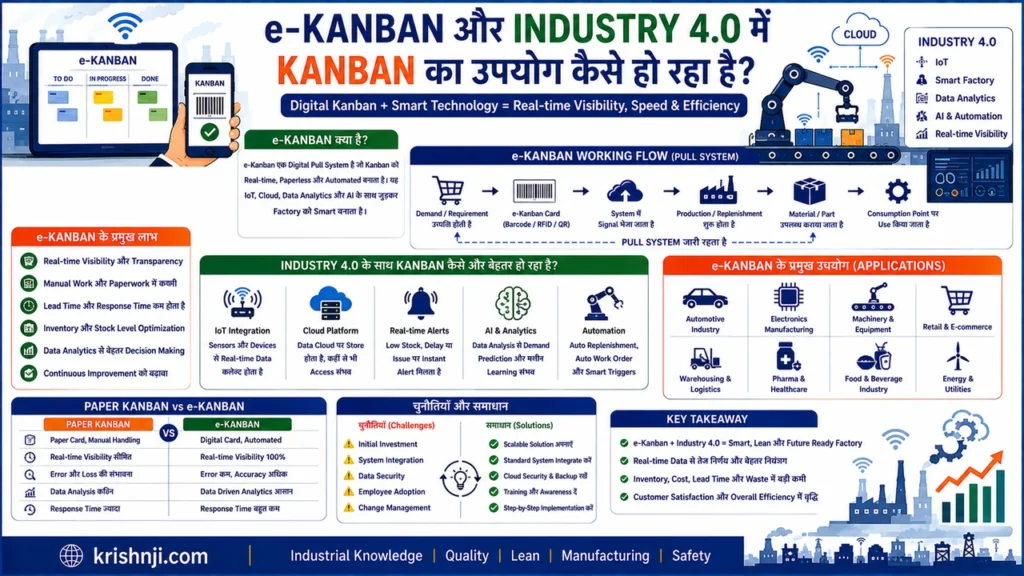
Traditional Kanban से e-Kanban तक
Traditional system में:
Material Consume
↓
Physical Kanban Card
↓
Material Handler
↓
Supermarket
↓
Replenishment
e-Kanban में यही flow digital हो जाता है:
Material Consumption
↓
Barcode / QR / RFID / Sensor
↓
Digital Kanban Signal
↓
ERP / MES / Kanban Software
↓
Automatic Replenishment Request
↓
Material Supply
कुछ modern systems barcode के अलावा sensors और automated signals का उपयोग भी कर रहे हैं।
e-Kanban में कौन-कौन सी Technologies उपयोग होती हैं?
1. Barcode और QR Code
Operator या material handler container को scan करता है।
Scan → Consumption Record → Digital Kanban Signal → Replenishment
एक Indian automobile-accessories manufacturing case में manual Kanban process को barcode scanning और SAP integration के साथ बदला गया था।
2. RFID
RFID tags के माध्यम से material/container की पहचान और movement को automatically track किया जा सकता है।
इससे हर container को manually scan करने की आवश्यकता कुछ applications में कम हो सकती है।
3. IoT Sensors
Industry 4.0 environment में sensors inventory या material consumption की स्थिति detect कर सकते हैं।
उदाहरण:
Bin Quantity ↓
↓
Sensor Detects Low Level
↓
e-Kanban Signal
↓
Replenishment Request
Modern e-Kanban solutions barcode के साथ weight और अन्य sensors से भी Kanban signals capture/generate कर रहे हैं।
4. ERP और MES Integration
e-Kanban को ERP/MES से connect करने पर Kanban signal केवल shop-floor notification नहीं रहता, बल्कि production और inventory information का हिस्सा बन सकता है।
उदाहरण:
Material Consumption
↓
e-Kanban Signal
↓
MES / ERP
↓
Inventory Update
↓
Replenishment / Production Requirement
Research और industrial implementations में e-Kanban को ERP integration के साथ इस्तेमाल करने के उदाहरण मिलते हैं।
5. Real-Time Kanban Dashboard
Traditional Kanban Board की जगह digital dashboard पर देखा जा सकता है:
- कितने Kanban signals pending हैं?
- कौन-सा material shortage में है?
- कौन-सा material transit में है?
- कौन-सा replenishment complete हो चुका है?
- किस production line में समस्या है?
- Inventory कितना है?
इससे supervisor को real-time visibility मिलती है।
6. Automatic Replenishment
e-Kanban का सबसे महत्वपूर्ण advantage यह है कि replenishment signal को automated किया जा सकता है।
उदाहरण:
Assembly Line पर 20 connectors consume हुए
↓
Barcode/Sensor detects consumption
↓
Digital Kanban generated
↓
Material Store को request
↓
Material Handler को task
↓
20 connectors replenish
इससे manual communication और paper-card handling कम हो सकती है।
Industry 4.0 में Kanban का Advanced Architecture
एक Smart Factory में architecture कुछ इस तरह हो सकता है:
Machine / Production Line
↓
Sensors / PLC
↓
IoT Gateway / Edge Device
↓
e-Kanban Platform
↓
MES / ERP
↓
Digital Kanban Dashboard
↓
Material Handler / AGV / Supplier
यहाँ Kanban केवल physical card नहीं रहता बल्कि digital information flow और material flow को जोड़ने वाला mechanism बन जाता है।
Battery Manufacturing का Practical Example
मान लीजिए battery assembly line में connector bins लगे हैं।
एक bin में:
50 Connectors
जब consumption के कारण bin निर्धारित minimum level पर पहुँचता है:
Sensor / QR Scan
↓
e-Kanban Signal
↓
MES/ERP Update
↓
Material Replenishment Request
↓
Material Handler
↓
50 Connectors → Assembly Line
अगर factory में AGV/AMR integrated है, तो future-ready setup में replenishment task को automated material movement system तक भेजना भी संभव हो सकता है।
e-Kanban और Traditional Kanban में अंतर (तालिका)
| आधार | Traditional Kanban | e-Kanban |
|---|---|---|
| Signal | Physical Card/Container | Digital Signal |
| Data Capture | Manual | Barcode/RFID/Sensor आदि |
| Visibility | Local | Real-time/Digital |
| Inventory Update | Manual/Periodic | Automated/Integrated |
| ERP/MES Integration | Limited/Manual | संभव |
| Tracking | Physical Card | Digital Traceability |
| Replenishment | Manual Trigger | Automated/Assisted |
| Data Analysis | Limited | आसान |
| Industry 4.0 Integration | कम | अधिक |
Kanban + IoT + AI का Future
Industry 4.0 में Kanban का अगला evolution केवल “Digital Kanban Card” तक सीमित नहीं है।
एक advanced system में:
IoT Data
↓
Real-Time Consumption
↓
e-Kanban
↓
ERP/MES
↓
Analytics / AI
↓
Demand & Inventory Prediction
↓
Optimized Replenishment
AI/analytics historical consumption, supplier lead time और demand patterns का उपयोग करके Kanban parameters को optimize करने में सहायता कर सकते हैं। हालांकि यह traditional Kanban का अनिवार्य हिस्सा नहीं, बल्कि Industry 4.0 का advanced extension है।
Industry 4.0 में Kanban के प्रमुख फायदे
e-Kanban से निम्न क्षेत्रों में improvement की संभावना होती है:
- Real-time inventory visibility
- Faster replenishment signals
- Manual data entry कम
- Kanban tracking बेहतर
- Material shortage जल्दी detect
- ERP/MES integration
- Supplier coordination
- Digital traceability
- Data-based Kanban optimization
- Production और logistics का बेहतर synchronization
एक peer-reviewed 2025 study ने Kanban 4.0 architecture में digital Kanban, real-time production/inventory metrics, OEE और ERP integration को एक integrated framework के रूप में explore किया है।
लेकिन e-Kanban लगाने से पहले ध्यान रखें
Digital Kanban का अर्थ केवल paper card को software में बदल देना नहीं है।
अगर मूल process में:
- गलत Kanban quantity
- unstable production
- unreliable supplier
- poor standard work
- inaccurate inventory
- frequent machine breakdown
हैं, तो software लगाने से मूल समस्या अपने आप खत्म नहीं होगी।
सबसे अच्छा approach है:
Stable Lean Process
↓
Standard Kanban Rules
↓
Digitalization
↓
Automation
↓
Analytics / Optimization
एक Industry 4.0 review में भी ऐसे cases मिले जहाँ पहले Lean/Kanban process स्थापित था और बाद में e-Kanban ने उसे digital और dynamic बनाया।
एक लाइन में निष्कर्ष
Industry 4.0 में Kanban का evolution Physical Card → e-Kanban → IoT-enabled Kanban → Integrated Smart Kanban की दिशा में हो रहा है, जहाँ real-time data, sensors, ERP/MES और automation मिलकर material replenishment और production flow को अधिक connected और responsive बनाते हैं।
Kanban Board बनाने के लिए कौन-कौन से Tools और Software उपयोग किए जाते हैं?
Kanban Board बनाने के लिए tool का चुनाव इस बात पर निर्भर करता है कि आपको केवल visual task management चाहिए, manufacturing material flow manage करना है, या ERP/MES के साथ e-Kanban system बनाना है। छोटे teams के लिए simple digital boards पर्याप्त हो सकते हैं, जबकि factory में barcode/QR, inventory, production और ERP/MES integration वाले solutions अधिक उपयोगी होते हैं।
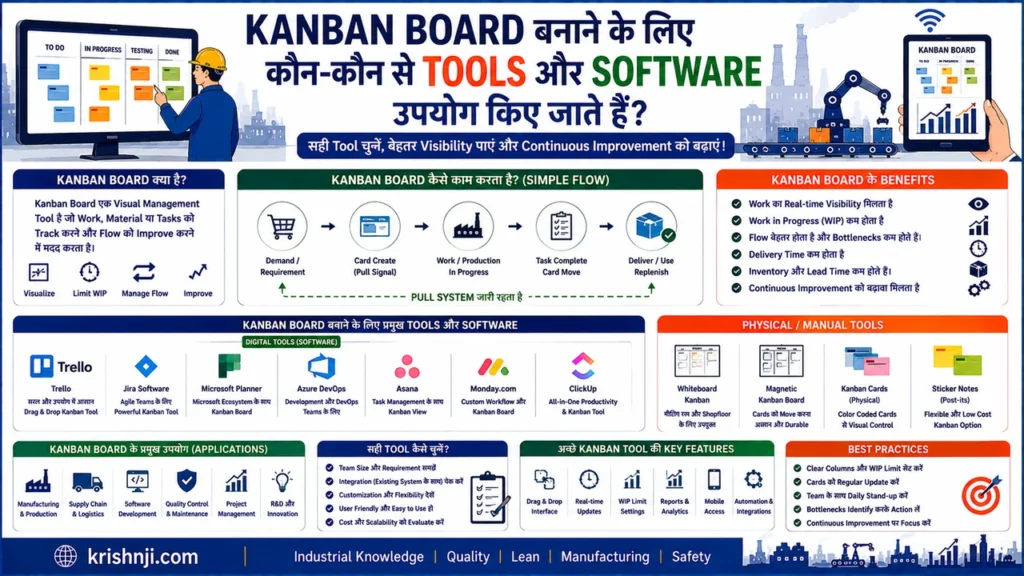
Kanban Board के लिए Tools की मुख्य Categories
| Category | उदाहरण | किसके लिए उपयोगी |
|---|---|---|
| Physical Board | Whiteboard + Cards | Shop Floor / Small Factory |
| Spreadsheet | Excel / Google Sheets | Basic Kanban |
| Project Management | Trello, Jira, Asana | Software/Office Teams |
| Agile Kanban | Jira Software | Development Teams |
| e-Kanban | Digital Kanban Platforms | Manufacturing |
| ERP-based | SAP आदि | Enterprise Manufacturing |
| MES Integration | MES + Digital Kanban | Smart Factory |
| Custom System | Web App + QR/Barcode | Specific Factory Needs |
1. Physical Kanban Board
Factory में सबसे simple तरीका है:
Whiteboard + Kanban Cards + Columns
उदाहरण:
To Do → In Progress → Testing → Done
Manufacturing में इसे material flow के लिए भी बनाया जा सकता है:
Store → Replenishment Required → In Transit → Line
इसके फायदे हैं:
- बहुत कम cost
- आसानी से समझ आता है
- Shop-floor पर visual management अच्छा
- Training आसान
लेकिन इसमें real-time data, historical analytics और remote monitoring सीमित होते हैं।
2. Microsoft Excel
Excel छोटे manufacturing setups के लिए Kanban Board बनाने का practical option है।
उदाहरण columns:
| Kanban ID | Part No. | Part Name | Qty | Status | Location |
|---|---|---|---|---|---|
| KB-001 | BC-101 | Connector | 20 | Replenishment | Assembly |
| KB-002 | BT-205 | Terminal | 50 | Available | Store |
Excel में:
- Drop-down status
- Conditional Formatting
- Filters
- Pivot Tables
- Dashboard
- Kanban calculation
जैसी सुविधाओं का उपयोग किया जा सकता है।
अगर factory अभी digital Kanban शुरू कर रही है, तो Excel एक अच्छा pilot tool हो सकता है।
3. Trello
Trello एक visual board-based tool है।
इसमें:
To Do → Doing → Done
जैसे columns बनाकर cards move किए जा सकते हैं।
यह मुख्यतः:
- Office work
- Project management
- Small teams
- Content/IT workflows
के लिए उपयोगी है।
Manufacturing के लिए इसे basic visual workflow के रूप में इस्तेमाल किया जा सकता है, लेकिन dedicated factory e-Kanban system के लिए इसकी capabilities को अलग से evaluate करना चाहिए।
4. Jira
Jira में Kanban boards और workflow management की सुविधाएँ हैं।
यह खासकर:
- Software Development
- IT Teams
- Agile Teams
- Product Development
में लोकप्रिय है।
इसमें WIP limits, workflows, reports और cycle-time related analytics जैसी सुविधाओं का उपयोग किया जा सकता है।
5. Asana
Asana में Board View के माध्यम से Kanban-style workflow बनाया जा सकता है।
यह:
Task → In Progress → Review → Complete
जैसे workflows के लिए उपयोगी है।
लेकिन traditional manufacturing material Kanban और inventory replenishment के लिए इसे ERP/MES या dedicated e-Kanban solution के विकल्प के रूप में सीधे नहीं मानना चाहिए।
Manufacturing के लिए e-Kanban Software
अगर आपका उद्देश्य actual factory material flow manage करना है, तो केवल project-management board की बजाय e-Kanban solution देखना ज्यादा उचित है।
ऐसे systems में निम्न capabilities हो सकती हैं:
- Kanban card management
- Barcode/QR scanning
- RFID integration
- Container tracking
- Inventory visibility
- Replenishment signals
- Supplier integration
- ERP/MES integration
- Digital dashboards
- Notifications
- Traceability
उदाहरण के तौर पर dedicated e-Kanban platforms उपलब्ध हैं, जिनका focus manufacturing material replenishment और shop-floor logistics पर होता है।
ERP में Kanban
बड़ी manufacturing companies में Kanban को ERP system के साथ integrate किया जा सकता है।
उदाहरण:
SAP जैसे ERP ecosystem में production और material management के साथ Kanban processes को integrate किया जा सकता है।
Typical flow:
Material Consumption
↓
Kanban Signal
↓
ERP Update
↓
Replenishment Requirement
↓
Material Supply
इसका फायदा यह है कि Kanban केवल shop-floor board तक सीमित नहीं रहता बल्कि inventory और production planning ecosystem से जुड़ जाता है।
Industry 4.0 के लिए Advanced Setup
अगर factory में Industry 4.0 infrastructure है, तो Kanban Board को केवल software screen न रखकर पूरा digital material-flow system बनाया जा सकता है।
Example Architecture
Machine / Assembly Line
↓
PLC / Sensor
↓
Barcode / QR / RFID
↓
e-Kanban System
↓
MES / ERP
↓
Digital Dashboard
↓
Material Handler / AGV / AMR
इससे material consumption और replenishment information को अधिक automated तरीके से manage किया जा सकता है।
आपके लिए कौन-सा Tool सही रहेगा?
अगर हम Manufacturing/Factory के हिसाब से देखें:
छोटे Factory / Pilot Project
Excel + Physical Kanban Board
सबसे practical और low-cost शुरुआत।
Medium Manufacturing Setup
Digital Kanban + Barcode/QR + Dashboard
Material tracking और replenishment visibility के लिए बेहतर।
Large Factory
e-Kanban + ERP/MES Integration
Production, inventory और supplier flow को integrate करने के लिए।
Smart Factory
IoT + e-Kanban + MES/ERP + RFID/Barcode + Analytics
यह Industry 4.0 level implementation की दिशा में जाता है।
Kanban Tool चुनने का Decision Framework
| आपकी जरूरत | Recommended Approach |
|---|---|
| सिर्फ visual workflow | Physical Board |
| Simple digital board | Excel / Sheets |
| Office/Project work | Trello / Asana |
| Agile Software Team | Jira |
| Factory material replenishment | e-Kanban |
| ERP integrated manufacturing | ERP Kanban |
| Smart Factory | e-Kanban + IoT + MES/ERP |
सबसे महत्वपूर्ण बात
Kanban Board और Kanban System एक ही चीज़ नहीं हैं।
Board केवल visualization tool है।
एक complete manufacturing Kanban system में:
Demand → Pull → Kanban Signal → WIP Limit → Replenishment → Material Flow → KPI Monitoring
जैसी पूरी process शामिल होती है।
इसलिए factory में software चुनते समय केवल “क्या इसमें Kanban Board है?” यह नहीं देखना चाहिए; बल्कि यह देखना चाहिए कि क्या वह inventory, replenishment, barcode/QR, ERP/MES integration और real-time material flow को support करता है।
Kanban से जुड़े Frequently Asked Questions (FAQs)
Kanban का अर्थ क्या है?
Kanban एक Japanese शब्द है, जिसका सामान्य अर्थ “Visual Signal” या “Visual Card” माना जाता है। Manufacturing में Kanban का उपयोग production और material replenishment को demand के अनुसार नियंत्रित करने के लिए किया जाता है। इसका उद्देश्य Pull System के माध्यम से आवश्यक material या work को सही समय पर उपलब्ध कराना है।
Kanban के कितने प्रकार होते हैं?
Kanban के प्रमुख प्रकारों में Production Kanban, Withdrawal Kanban, Supplier Kanban, Signal Kanban और Electronic Kanban (e-Kanban) शामिल हैं। अलग-अलग factories में Kanban की classification उनके process, material flow और replenishment requirements के अनुसार अलग हो सकती है।
Kanban का मुख्य उद्देश्य क्या है?
Kanban का मुख्य उद्देश्य Pull-based flow बनाना, WIP और inventory को नियंत्रित करना तथा overproduction को कम करने में मदद करना है। यह downstream consumption के आधार पर upstream production या material replenishment का signal देता है।
Kanban में Pull System क्या होता है?
Pull System में upstream process अपनी सुविधा के अनुसार production नहीं करता, बल्कि downstream process की वास्तविक आवश्यकता या consumption के आधार पर work या material को pull किया जाता है। Kanban इसी Pull System को visual signal के माध्यम से operational बनाने में मदद करता है।
Kanban में WIP Limit क्यों महत्वपूर्ण है?
WIP Limit यह निर्धारित करती है कि किसी workflow या process में एक समय पर कितना work मौजूद हो सकता है। इससे excessive WIP, multitasking और process congestion को नियंत्रित करने तथा bottlenecks को जल्दी पहचानने में मदद मिलती है।
Kanban और JIT में क्या संबंध है?
Just in Time (JIT) का उद्देश्य आवश्यक material को सही मात्रा में सही समय पर उपलब्ध कराना है, जबकि Kanban Pull और replenishment का signal प्रदान करने वाला mechanism है। इसलिए Kanban, JIT के demand-driven material और production flow को operational रूप से support कर सकता है।
Kanban और Lean Manufacturing में क्या संबंध है?
Kanban Lean Manufacturing का एक महत्वपूर्ण Pull और Flow Management method है। यह WIP, inventory और overproduction को नियंत्रित करने तथा continuous flow और visual management को support करता है। Lean Manufacturing Kanban से कहीं व्यापक approach है।
Kanban और Scrum में क्या अंतर है?
Kanban मुख्य रूप से continuous flow, Pull System और WIP limits पर आधारित है, जबकि Scrum fixed-length Sprints, defined roles, events और incremental delivery पर आधारित Agile framework है। Kanban Manufacturing में भी व्यापक रूप से उपयोग होता है, जबकि Scrum मुख्यतः software और product development में लोकप्रिय है।
क्या Kanban केवल Manufacturing में ही उपयोग किया जाता है?
नहीं। Kanban की शुरुआत Manufacturing और Toyota Production System के context में हुई, लेकिन आज इसका उपयोग Software Development, IT, Project Management, Customer Support, Product Development और अन्य workflow-based processes में भी किया जाता है।
Kanban में कितने Kanban Cards होने चाहिए?
Kanban Cards की संख्या fixed universal number नहीं होती। यह demand, consumption rate, replenishment lead time, container quantity और required buffer जैसे factors पर निर्भर करती है। बहुत कम cards से stockout का risk बढ़ सकता है, जबकि बहुत अधिक cards inventory और WIP बढ़ा सकते हैं।
क्या Kanban और Kanban Board एक ही चीज़ हैं?
नहीं। Kanban एक व्यापक Pull और Flow Management system/method है, जबकि Kanban Board work या material flow को visualise करने का एक tool है। Manufacturing में Kanban system में cards, containers, replenishment rules और WIP controls भी शामिल हो सकते हैं।
क्या Kanban में Inventory Zero रखी जाती है?
नहीं। Kanban का उद्देश्य inventory को हर स्थिति में zero करना नहीं है। इसका उद्देश्य controlled inventory के साथ reliable material flow बनाना है। Demand variation, supplier lead time और process reliability के अनुसार कुछ buffer या safety stock आवश्यक हो सकता है।
क्या Kanban और Heijunka एक ही हैं?
नहीं। Heijunka Production Leveling के लिए उपयोग किया जाता है, जबकि Kanban मुख्य रूप से Pull और Replenishment Signal प्रदान करता है। दोनों को साथ उपयोग करने पर production को level करने और material flow को demand के अनुसार नियंत्रित करने में मदद मिल सकती है।
Kanban से जुड़े Interview Questions & Answers
1. Kanban System में Pull और Push Production में क्या अंतर है?
उत्तर: Push System में production को forecast या predefined schedule के आधार पर आगे भेजा जाता है, जबकि Kanban-based Pull System में downstream process की actual requirement upstream process को production या replenishment का signal देती है। इससे unnecessary production और excess WIP को नियंत्रित करने में मदद मिलती है।
2. Kanban में Supermarket क्या होता है?
उत्तर: Supermarket एक controlled inventory location है जहाँ निर्धारित quantity में components या materials रखे जाते हैं। Downstream process यहाँ से material withdraw करता है और consumption के आधार पर upstream process को replenishment signal मिलता है।
3. Kanban Quantity कैसे निर्धारित करते हैं?
उत्तर: Kanban quantity निर्धारित करते समय average consumption, replenishment lead time, demand variation, container size और required safety buffer को ध्यान में रखा जाता है। Quantity इतनी होनी चाहिए कि material availability बनी रहे लेकिन unnecessary inventory भी न बढ़े।
4. Kanban में कितने Containers रखने चाहिए?
उत्तर: Containers की संख्या consumption rate और replenishment lead time पर निर्भर करती है। सामान्यतः यह सुनिश्चित किया जाता है कि एक container production में हो, दूसरा replenishment में हो और आवश्यकतानुसार अतिरिक्त buffer उपलब्ध हो। Actual number process data के आधार पर तय किया जाना चाहिए।
5. अगर Kanban Card खो जाए तो क्या करना चाहिए?
उत्तर: सबसे पहले duplicate production या duplicate replenishment को रोकना चाहिए। Kanban ID या digital record से card की स्थिति verify करनी चाहिए। भविष्य में barcode/QR code, card holder और standardized control point का उपयोग करके ऐसी errors को कम किया जा सकता है।
6. Kanban में Bottleneck कैसे Identify करते हैं?
उत्तर: Kanban Board पर जिस process के सामने लगातार WIP या work queue जमा होती है, वह potential bottleneck हो सकता है। इसके बाद Cycle Time, Throughput, Capacity और waiting time का data देखकर वास्तविक constraint की पुष्टि की जाती है।
7. अगर Kanban के कारण बार-बार Material Shortage हो तो क्या करेंगे?
उत्तर: केवल Kanban quantity बढ़ाना पहला समाधान नहीं होना चाहिए। पहले shortage का root cause identify करें—जैसे supplier delay, inaccurate consumption data, replenishment delay, machine downtime या गलत Kanban parameters। Root cause के आधार पर system को adjust करना चाहिए।
8. Kanban और Safety Stock में क्या संबंध है?
उत्तर: Kanban controlled replenishment को manage करता है, जबकि Safety Stock unexpected demand variation या supply disruption के विरुद्ध buffer प्रदान कर सकता है। दोनों का उद्देश्य अलग है, लेकिन कुछ manufacturing environments में दोनों साथ उपयोग किए जा सकते हैं।
9. Kanban System में FIFO क्यों महत्वपूर्ण है?
उत्तर: FIFO यानी First In, First Out से material को उसके arrival sequence के अनुसार consume किया जाता है। इससे ageing, obsolete inventory और material mix-up को नियंत्रित करने में मदद मिल सकती है, खासकर ऐसे components में जिनकी shelf life या traceability महत्वपूर्ण हो।
10. Kanban और Takt Time का क्या संबंध है?
उत्तर: Takt Time customer demand के अनुसार required production pace बताता है, जबकि Kanban उस demand-driven flow में production और replenishment को signal करता है। Takt Time का उपयोग Kanban quantity, replenishment frequency और capacity planning को समझने में input के रूप में किया जा सकता है।
11. Kanban लागू करने से पहले कौन-कौन सी conditions जरूरी हैं?
उत्तर: Process stability, reasonably predictable consumption, standardized work, reliable replenishment और accurate inventory information महत्वपूर्ण हैं। यदि machine breakdown, quality problems या supplier delays बहुत अधिक हों, तो पहले process stability improve करना आवश्यक हो सकता है।
12. Kanban में WIP Limit बहुत कम रखने से क्या समस्या हो सकती है?
उत्तर: बहुत कम WIP Limit से downstream process को पर्याप्त work न मिल पाने के कारण starvation हो सकता है। इसलिए WIP Limit को वास्तविक process capacity, variability और flow data के आधार पर निर्धारित करना चाहिए।
13. Kanban में WIP Limit बहुत अधिक होने पर क्या होगा?
उत्तर: अत्यधिक WIP से queues, waiting time, congestion और lead time बढ़ सकते हैं। इसलिए WIP Limit का उद्देश्य production को रोकना नहीं बल्कि controlled flow और bottleneck visibility बनाए रखना है।
14. Physical Kanban और e-Kanban में क्या अंतर है?
उत्तर: Physical Kanban में cards, containers या physical signals का उपयोग होता है, जबकि e-Kanban में barcode, QR code, RFID, sensors और software-based digital signals का उपयोग किया जा सकता है। e-Kanban को ERP/MES से integrate करके real-time visibility और automated replenishment को support किया जा सकता है।
15. Kanban System की सफलता कैसे Verify करेंगे?
उत्तर: Implementation के बाद केवल inventory reduction नहीं देखना चाहिए। WIP, Lead Time, Cycle Time, Throughput, Stockout Frequency, Replenishment Lead Time, Material-related Downtime और On-Time Replenishment जैसे KPIs को baseline के साथ compare करना चाहिए।
16. अगर Production Line में अचानक Demand बढ़ जाए तो Kanban कैसे Handle करेगा?
उत्तर: पहले demand increase की प्रकृति और duration को समझना चाहिए। यदि increase temporary है तो existing buffer और replenishment rules पर्याप्त हो सकते हैं; लेकिन sustained demand increase होने पर Kanban quantity, number of cards, production capacity और supplier capacity को data के आधार पर revise करना पड़ सकता है।
17. Kanban में “Stop Producing” Signal कब महत्वपूर्ण होता है?
उत्तर: जब downstream process की requirement पूरी हो जाए या निर्धारित WIP/inventory limit reach हो जाए, तब upstream process को आगे production रोकने या अगले signal की प्रतीक्षा करने की आवश्यकता हो सकती है। यही Pull System को uncontrolled Push Production में बदलने से रोकता है।
18. Factory में Kanban Implement करते समय सबसे common mistake क्या होती है?
उत्तर: सबसे common mistakes में केवल Kanban Board लगा देना, गलत Kanban quantity तय करना, WIP limits को ignore करना, cards को बिना control के duplicate करना और unstable processes पर सीधे Kanban लागू करना शामिल हैं। Kanban को visual board नहीं बल्कि standardized Pull System के रूप में implement करना चाहिए।
19. Kanban में Continuous Improvement कैसे किया जाता है?
उत्तर: Kanban workflow में WIP accumulation, delays, stockouts और bottlenecks को identify करके root cause analysis किया जाता है। फिर Kaizen, Standardized Work, Line Balancing या Process Improvement के माध्यम से बदलाव किए जाते हैं और KPI performance दोबारा measure की जाती है।
20. Manufacturing Interview में Kanban को एक Practical Example से कैसे समझाएँगे?
उत्तर: उदाहरण के लिए Assembly Line में एक container में 20 connectors रखे हैं। जब connectors consume होकर container खाली होता है, तो empty container या Kanban card replenishment signal बनता है। Material handler supermarket से 20 connectors लेकर आता है और खाली container replenish होता है। इस तरह consumption के आधार पर material pull होता है।
यह भी पढ़ें….
Andon System क्या है? | प्रकार, काम करने का तरीका, उदाहरण और फायदे
Poka Yoke in Hindi | कार्य सिद्धांत, प्रकार, उदाहरण, लाभ, उपयोग, PDF
5S in Hindi | 5S क्या होता है?, अर्थ, 5 चरण, उदाहरण, लाभ और Implementation Guide
Kanban क्या है?- की Free PDF Download करें।
Kanban क्या है? — 200 Interview Questions & Answers Free PDF Download

नमस्कार! मेरा नाम Anshu Kumar है और मैं Krishnji.com का Founder एवं Technical Content Writer हूँ। मैं Manufacturing Industry में Assistant Engineer के रूप में कार्यरत हूँ और Quality Management, Production, Root Cause Analysis (RCA), 7 QC Tools, Lean Manufacturing, Six Sigma, Kaizen, 5S, TPM, SPC, ISO Standards, Science तथा Continuous Improvement जैसे विषयों पर व्यावहारिक अनुभव रखता हूँ।